Five Steps to Track Every Client in One Dashboard
To track AI visibility for multiple clients in one dashboard, put every client in a single account as its own site, build each client's prompt set the same way, run them all on one schedule, read one roll-up with a row per client, and open only the clients whose numbers moved. That's the whole method, and it holds whether you manage three clients or thirty.
- Add every client as its own site in one account, behind one login.
- Build each client's prompt set from the same four slots, so results compare fairly.
- Run every client on one schedule, on each assistant, every week.
- Read one roll-up, a row per client with the same six columns.
- Open only the clients that moved, and leave the rest alone.
The reason to set this up now is that nearly half of agencies can't see this channel yet. AgencyAnalytics drew 494 responses for its 2026 Marketing Agency Benchmarks, covered by Digital Agency Network in July, and 48% said they can't reliably track the people who discover brands through AI tools. Without one place to see every client, that blind spot repeats on every account, each with its own login, its own sheet, and its own hour.
Step 1. Put Every Client in One Account as Its Own Site
Start with the structure. You want one account, one login, and one site per client. Each site holds that client's domain, its city or service area, its tracked prompts, and the competitors you want to watch. Keeping clients as separate sites inside a single account gives you one list to sort and a clean wall between one client's data and the next.
In Lighthouse Local this is the default. Every client lives in one agency account, and you add clients and switch between them from the same dashboard. Each site is then checked on its own by Lighthouse Local's AI visibility tracker. If the tool you use makes every client a separate login, the roll-up in step 4 becomes something you assemble by hand each week. Check that, along with how many times the tool samples each prompt, as you evaluate a tracker on a trial before you load twenty clients.
Step 2. Build Each Client's Prompts From the Same Four Slots
A prompt is a question a customer would ask an assistant, like who to hire or what a job should cost. Every client needs its own set, written for its service and city, and every set should have the same shape. Fill the same four slots for every client, three prompts in each.
CLIENT: [business name], [service], [city]

SLOT 1, RECOMMENDATION
best [service] in [city]
who should I hire for [most common job] in [city]
top rated [service] companies near [neighborhood]

SLOT 2, COST
how much does [most common job] cost in [city]
what is a fair price for [service] in [city]
affordable [service] in [city] with good reviews

SLOT 3, URGENT OR SPECIFIC NEED
[urgent problem] in [city], who can come today
[specific service] near [neighborhood]
[service] open on weekends in [city]

SLOT 4, BRAND CHECK
is [business name] in [city] any good
[business name] vs. [closest competitor]
what do customers say about [business name]

DAILY CHECK: the one prompt from slots 1 to 3 that brings in the most revenue
The slots need to match because the type of question changes the result. In June 2026, Search Engine Journal published a Peec AI study of prompt intent and brand mentions that analyzed 37,804 answers and found a ranking-style prompt, the kind that asks for the top providers, raised average brand visibility by 20%. A client whose set is all ranking prompts will look healthier than one whose set is all open-ended questions, for reasons unrelated to your work.
Twelve prompts per client is enough to start. A set that small gives you a directional read, so grow a client's set before you lean on the small changes in step 5. On Lighthouse Local agency plans, prompts and competitors sit in one shared pool that you allocate across clients however you like, so a client with three service lines can take more of the pool than a single-service shop.
Step 3. Run Every Client on One Schedule, on Each Assistant
Check every client's prompts on ChatGPT, Gemini, Claude, Perplexity, and Google AI, and do it on a fixed schedule, weekly at minimum. The schedule matters more than the frequency. If one client was last checked on Tuesday and another three weeks ago, your roll-up compares two different months and tells you nothing. Lighthouse Local runs a weekly sweep of every prompt for every client, plus a daily check on the prompts you mark as most important.
Keep each assistant's results separate, because the assistants disagree. In FTA Global's Context Report, covered by Social Samosa in September 2026, two assistants given an identical question in one city shared only about 3.2 of their top five brands. One blended number per client hides that.
Step 4. Read One Roll-Up With the Same Six Columns
The roll-up is the dashboard this guide is named for. It's one row per client and six columns, and it's the only screen you need to read before deciding where the week goes.
- Answers. How many AI answers were captured for the client in the last 30 days.
- Named, in two periods. The share of answers that said the client's name, for the prior 30 days and the last 30 days, side by side. That's two columns.
- Cited. The share of answers that used the client's website as a source.
- Competitor named instead. The share of answers that named a tracked competitor and left the client out.
- Weakest assistant. The assistant that produced the most of those competitor-only answers.
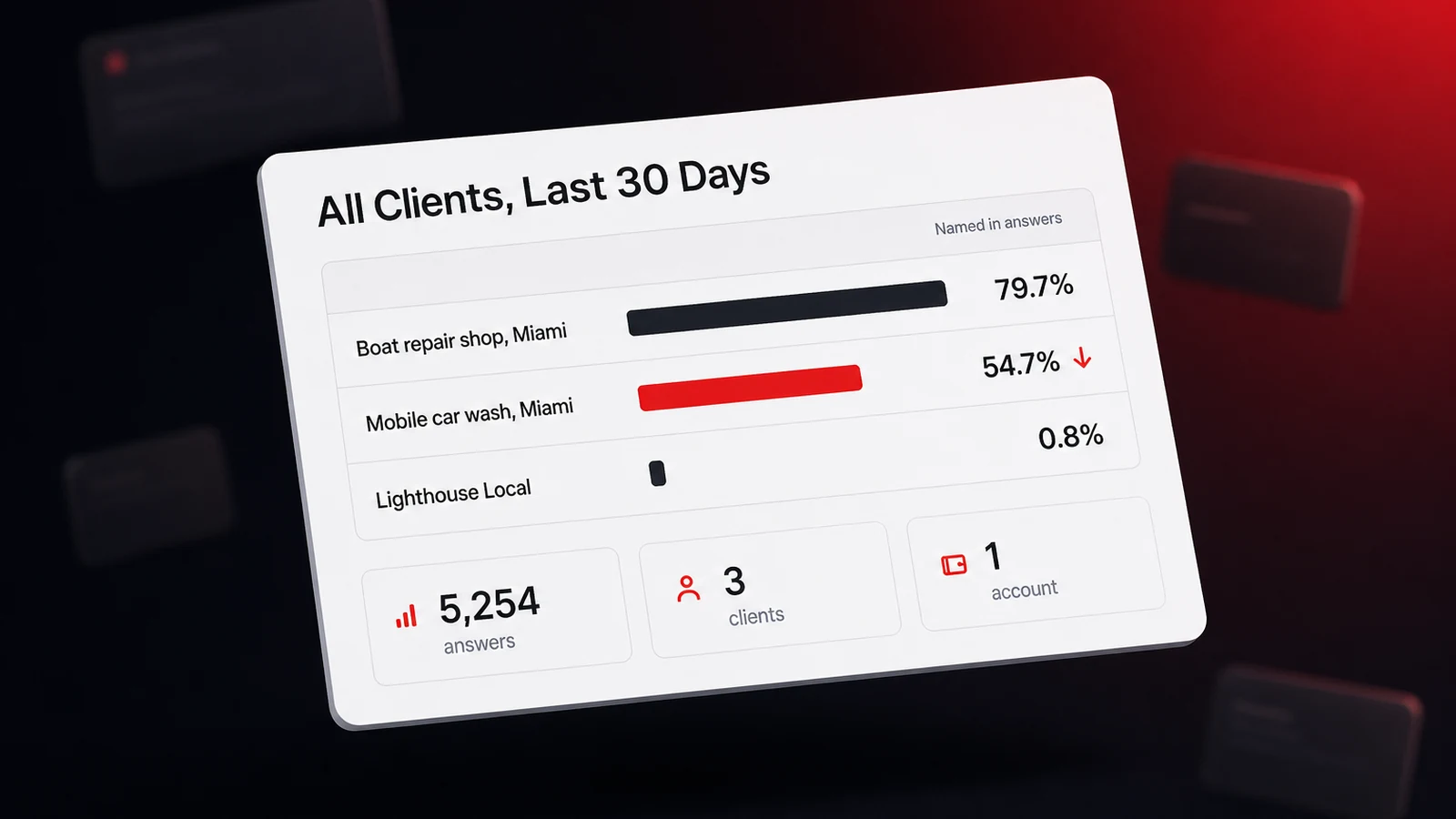
Here's what it looks like for three sites on an agency account we run ourselves, covering September 2 to October 1, 2026.
| Client | Answers | Named, prior 30 days | Named, last 30 days | Cited | Competitor named instead | Weakest assistant |
|---|---|---|---|---|---|---|
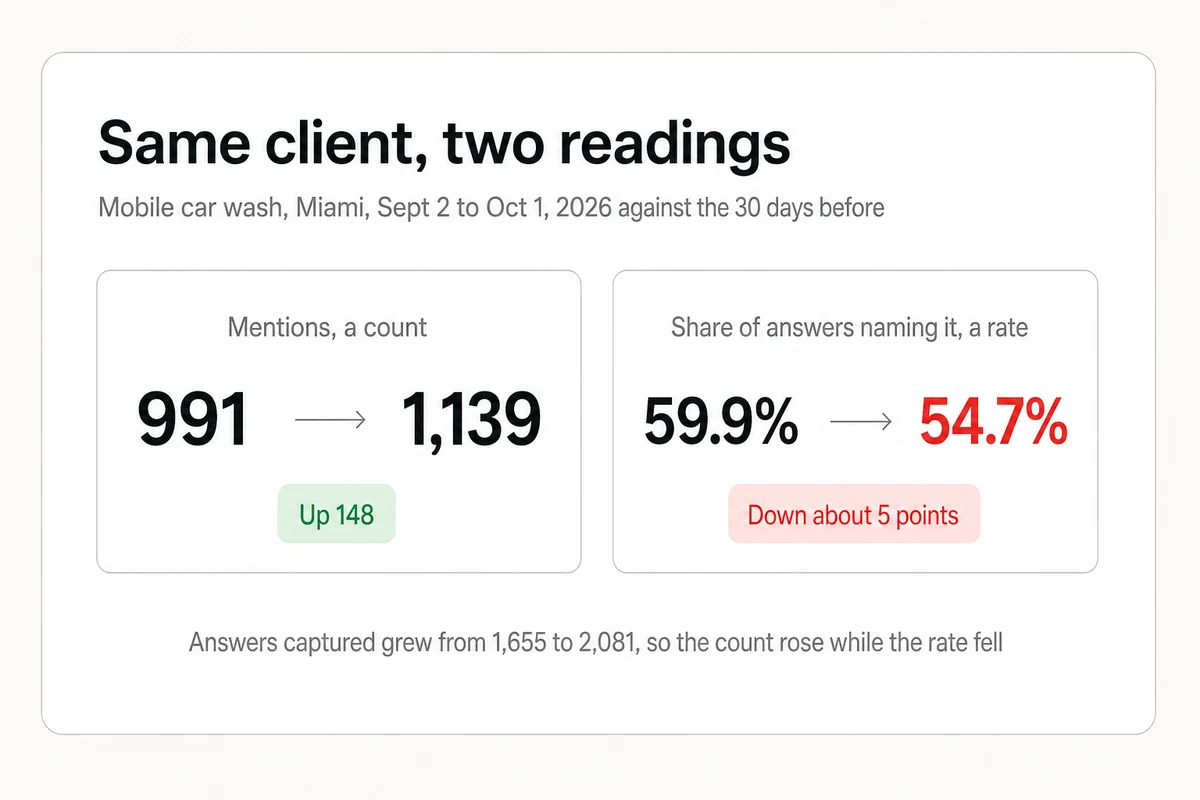
| Mobile car wash, Miami | 2,081 | 59.9% | 54.7% | 66.3% | 22.1% | Gemini, 297 of 459 competitor-only answers |
| Boat repair shop, Miami | 581 | 78.7% | 79.7% | 68.5% | 14.3% | Gemini, 45 of 83 competitor-only answers |
| Lighthouse Local, our own site | 2,592 | 0.6% | 0.8% | 2.4% | 34.4% | Gemini, 237 of 892 competitor-only answers |
Two choices make this table useful. The first is using a rate for the named columns, not a raw count. The car wash's mentions went up last month while its named rate went down, because the tracker captured many more answers and the mentions didn't keep pace. The second is showing two periods, so the row that changed stands out without anyone opening a client.
If you use Lighthouse Local, one way to build this table is by connecting an AI assistant to the account and asking for it. The connection is read-only and sees only the sites in the organization you sign in with. How cleanly the table comes back depends on the assistant, so check the first one against the dashboard.
For every site in my Lighthouse Local account, compare the last 30 days with the 30 days before.

Build one table with a row per site and these columns:
1. Answers captured in the last 30 days
2. Share of answers that named the business, prior period and current period
3. Share of answers that cited the site
4. Share of answers where a competitor was named and the business was not
5. The assistant with the most competitor-only answers, with its count

Sort by the biggest change in named share, up or down. Then list up to three sites I should open first, with one sentence on why for each.
If you track by hand, the same six columns work in a spreadsheet, one client to a row. Mark each answer as naming the client, citing its site, or naming only a competitor, then divide each count by the answers you ran. The weakest assistant is the one with the most competitor-only marks.
Step 5. Open Only the Clients That Moved
Once a week, sort the roll-up by the size of the change in named rate and open up to three clients that moved past the threshold below. Leave the rest alone until next week. For each client you open, read the weakest assistant's answers first, work out which competitors the assistants name instead, and write down one fix. In the table above, that means opening the car wash and starting with its Gemini answers.
Don't react to a single answer or a single day, because AI answers change on their own. In a study of 43,000 keywords published in November 2025, Ahrefs found that an AI Overview has a 70% chance of changing from one observation to the next. A screenshot of one bad answer isn't a trend. The 30-day rate is.
The threshold keeps the sort from sending you after noise. Once a client has about a thousand answers a month, treat a move under five points as flat and anything larger as worth opening. With fewer answers than that, a five-point move can still be noise, so wait for a second month before you act on it.
Give Each Client Its Own View, Never the Roll-Up
The roll-up is for your team. No client should see another client's row. What each client gets is its own view of the same data. With Lighthouse Local you share a white-labeled report of each client's results on your own domain and under your brand, and our walkthrough of white-label AI visibility tracking for agencies shows that client view in detail. Reporting to clients each month can stay as short as a one-page AI visibility report with the named rate by assistant, the rivals named, wrong facts, cited pages, and one fix.
Bring one thing from the roll-up into every client conversation, the weakest assistant. A client who checks one assistant and sees their own name will assume the others agree. Telling them which assistant keeps naming a competitor is a clearer brief than any single score, and it tells them what next month's work is for.
When a Spreadsheet Is Enough, and When to Switch
You can run every one of these steps in spreadsheets, and for a handful of clients you probably should, since it teaches you what the numbers mean before you pay for anything. The arithmetic turns quickly, though. Our guide to tracking a brand's visibility in AI search budgets about an hour per weekly pass for one client's twelve-prompt scorecard, which is 60 answers across the five we track. Three clients is a Monday morning. Ten clients is 600 answers and ten hours every week, roughly 43 hours a month, before anyone has fixed a thing.
| Question | Spreadsheet per client | Multi-client AI visibility tracker |
|---|---|---|
| Where a client lives | Its own sheet or tab | A site inside one account |
| Adding client eleven | Another hour a week | Another site drawing on a shared pool |
| Assistants covered | Whichever you have time to open | Each tracked assistant, on a schedule |
| Cross-client roll-up | Built by hand from every sheet | One question across every site |
| Fits | Up to four clients, while you learn the numbers | Five clients and up, or anyone reporting weekly |
The honest dividing line is around five clients. Below it, the sheet is slower but free, and the hour teaches you something. Above it, the hours pile up faster than a tracker's cost, and a hand-run sample of about 240 answers a month per client is too thin to confirm a five-point change.
Keep One List and Sort It Every Week
Multi-client tracking fails when it's a pile of separate dashboards and works when it's one list you can sort. Put every client in one account. Build each prompt set from the same four slots. Run them on one schedule, compare rates across two periods, and open only the clients that moved. If you'd rather not build the sheet, Lighthouse Local for Agencies keeps every client in one account under your brand, and its 14-day free trial is long enough to load your first few clients and try the roll-up prompt yourself. And when a client's weakest assistant turns into fix work you'd rather hand off, our specialists can do it under your brand while you keep the margin. Start with the row that moved, and let the flat ones stay flat.
Frequently asked questions
How do I track AI visibility for multiple clients without a separate login for each?
Put every client in one account as its own site, with its own prompts and competitors, and read a single roll-up with one row per client. In Lighthouse Local, every client lives in one agency account behind one login, and you add clients and switch between them from the same dashboard.
How many prompts should each client have?
Twelve is enough to start, three in each of four slots. Those slots are a recommendation ask, a cost question, an urgent or specific need, and a brand check. Keep the slots identical across clients so their rates compare fairly, then give more prompts to clients with more service lines.
What should a multi-client AI visibility dashboard show?
One row per client and six columns. Answers captured, the share of answers naming the client in the prior 30 days and in the last 30 days, the share citing the client's site, the share naming a competitor instead, and the assistant where competitors win most often.
Why does ChatGPT name my client when Gemini names a competitor?
Each assistant draws on different sources and weighs them differently, so one business can win on one assistant and lose on another. In one 2026 test, two assistants asked an identical question shared only about 3.2 of their top five brands. Track each assistant separately and report the weakest one.
Can I track AI visibility for several clients in a spreadsheet?
Yes, for up to about four clients. A hand-run scorecard of twelve prompts on each assistant takes about an hour per client per pass, so ten clients cost roughly ten hours a week. From five clients on, the hours pile up faster than a tracker's cost, and the sample is too small to confirm a small change.
What should I do when one client's AI visibility drops?
First confirm the drop shows in the 30-day rate, across about a thousand answers, and is larger than about five points, since single answers change constantly. Then read the weakest assistant's answers for that client, note which competitor is being named, and assign one fix before the next weekly review.
Should clients see the multi-client dashboard?
No. The roll-up is internal. Each client should see only its own results, ideally on your domain and under your brand, with the weakest assistant called out so next month's work has a clear purpose.