Claiming Your Business in ChatGPT Takes Two Approvals, Not One
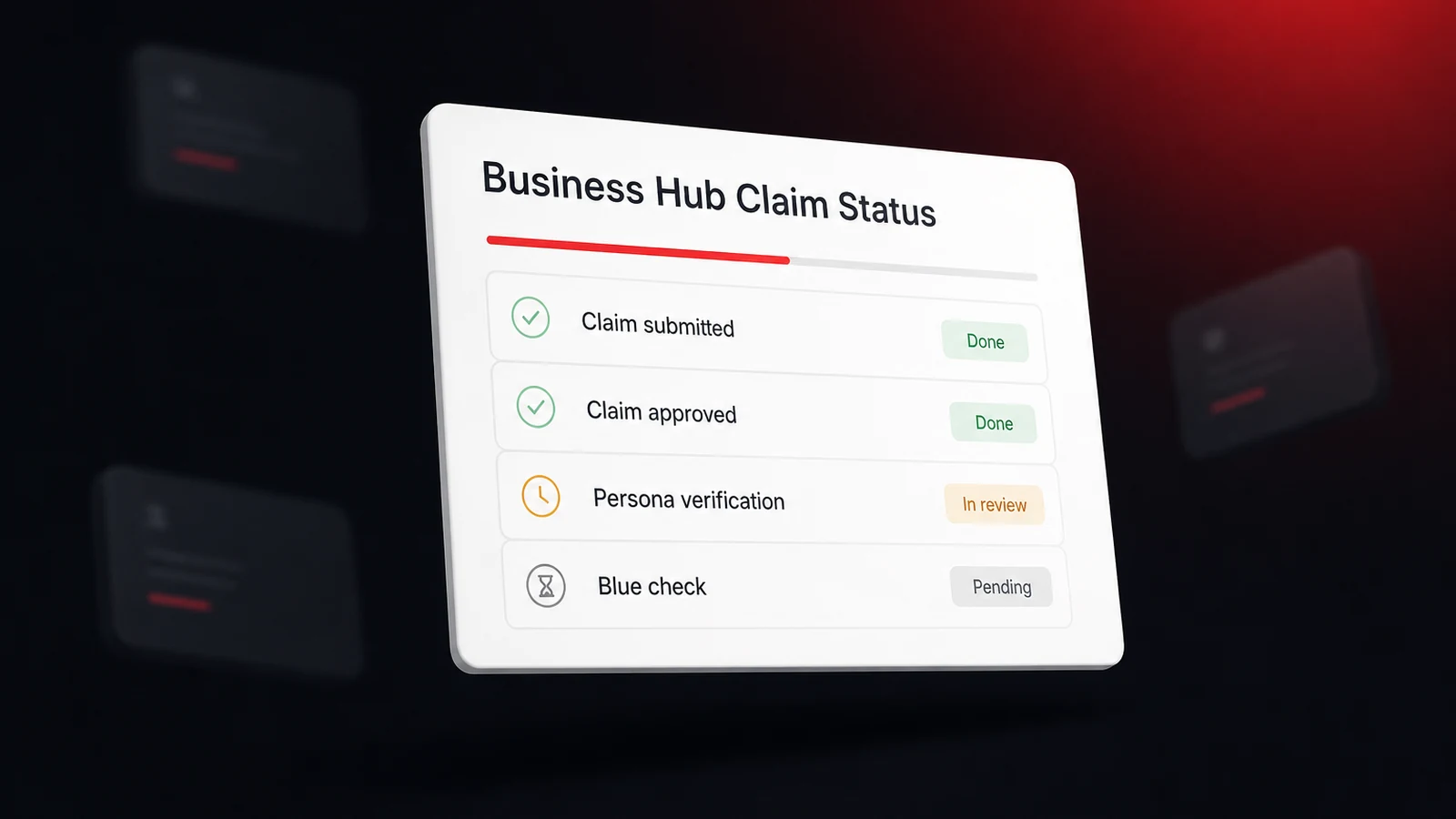
To claim your business in ChatGPT, sign in, open Business Hub from the sidebar, search for your business by name, pick the matching listing, and prove you represent it by business phone, business email, a DNS record on your website domain, or a connected Shopify store. OpenAI then reviews the claim and emails a decision. That's the first approval. The second is an identity check through a verification company called Persona, and until it clears you can't publish edits, see insights, or get the blue check. OpenAI opened all of this on November 10, 2026, when it introduced Businesses in ChatGPT in beta and put the number of people using ChatGPT each week at 1.2 billion.
On November 6, our post on getting your business recommended by ChatGPT said there was nothing to claim. That was true that day and it's wrong now, so we've corrected it. What hasn't changed is the part owners care about most. OpenAI has said in its help center, on its sign-up page, and in a press briefing that claiming doesn't move you up in ChatGPT's recommendations, and the reasons to claim anyway are narrower and more practical than the announcement makes them sound.
Who Can Claim Today, and Where Local Shops Hit a Wall
You can claim a business you own or are authorized to represent, in a place where ChatGPT is offered and the verification is supported. OpenAI's Businesses in ChatGPT overview adds that claiming is "initially available to eligible businesses with a website", and that eligibility turns on industry, location, and its own integrity checks. You don't need an ads account or an enterprise contract. Digiday reported from the launch briefing that Business Hub and agents are free for now, and that Benji Shomair, OpenAI's vice president of monetization, didn't rule out a paid model later.
Local owners should read one line of the help article before anything else. If your business doesn't come up in the search, an eligible online business may get an option to add itself, but local stores and restaurants can currently claim only a listing that already exists, and only in the U.S. So a U.S. shop with a website and a listing that shows up can claim it today. A cafe in Toronto can't, and neither can a U.S. shop ChatGPT has no listing for. OpenAI doesn't say how a local listing gets created. Our read is that it's assembled from the same outside records AI pulls local business data from, so keeping those right is the only move available until a listing appears.
Business Agents, the separate chat a customer can open with your business from its profile, are a smaller door again. OpenAI's Business Agents Policy and help article limit them for now to eligible ecommerce and online service businesses in the U.S., and the policy says business verification alone doesn't guarantee agent eligibility. A local service business can hold a claimed, verified profile and still have no agent option. That's the design, not an error on your account.
The Claim, Step by Step in Business Hub
These steps follow OpenAI's help article, Setting up your business on ChatGPT, as it read on November 10, 2026. It's a beta and the article was edited the day we read it, so check each step against your own screen.
- Sign in and open Business Hub. It's in the ChatGPT sidebar, or go straight to https://chatgpt.com/business-hub. Use the ChatGPT account you want to manage the business from, because you confirm that account as part of the claim.
- Search for your business by name. Select the listing that matches, and check the address first, since a common name can return several.
- Choose a verification method. You'll only see the ones offered for your business.
- Wait for the claim decision. OpenAI reviews the claim and emails an approval or a request for more information. You can cancel while it's under review.
| Verification method | What you do | Our pick when |
|---|---|---|
| Business phone | Get a code by text or automated call to the number shown | The listing's number is one you answer |
| Business email | Get a code at the email address associated with the business | You still have that inbox |
| Website domain | Add the TXT record ChatGPT shows you to your domain's DNS, then select Verify domain | You or your web person can edit DNS |
| Shopify store | Connect Shopify and sign in to the store you're claiming | You sell through Shopify |
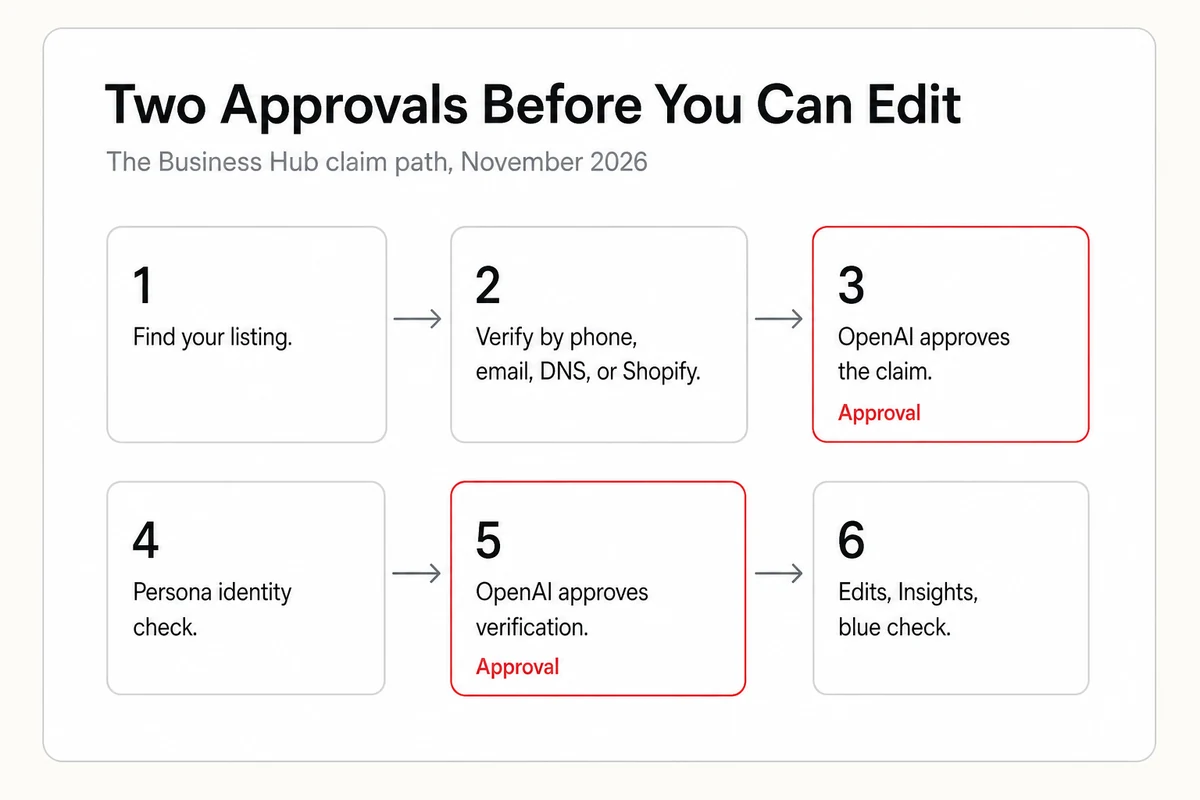
Three side paths exist. If a claim invitation arrived by email, open its personal link and sign in with the address that received it, and don't forward it to give someone else access. If the listing shows Contact support, it's locked, and support is the way in. And if someone has already claimed your business, open the profile, use the more options menu, and choose Dispute ownership, which runs through the identity check described next.
Persona Verification Turns a Claim Into Control
An approved claim only gets you in the door. To publish a change, connect a product feed, see insights, or create an agent, you have to pass identity verification with Persona. The help article says you may need a government-issued ID, business registration information, and proof that you're authorized to represent the business. Have the business name, address, and any registration or tax number written exactly as they appear on your official records, because matching them is the article's own advice for a check that fails.
| Stage | What it opens |
|---|---|
| Claim approved | Access to your business in Business Hub |
| Persona verification approved | Publishing edits, connecting a product feed, viewing Insights, the blue check, and an agent if you're eligible |
The blue check follows the same line. Claiming alone doesn't add it, and it appears only after your Persona verification is approved. There's also a warning that's easy to miss. If you use Persona to create a brand-new profile, OpenAI's approval publishes that profile automatically, with no separate publish step, and OpenAI Support can't delete, unpublish, or hide a published profile afterward. Only an unpublished draft can be deleted. Start Persona when the details are ones you're ready to have live.
What You Can Edit After Both Approvals
With both approvals in, the Business tab lets you update your website, business description, product or service category, logo, delivery policy, and return policy, and add a cover photo and other optional details. That list reads like it was written for online sellers, which fits a launch that leads with ecommerce. OpenAI's profile rules for Businesses in ChatGPT also cover the business name, address or service area, hours, and contact details, so expect the fields a local listing shows to shift while the beta settles.
Three limits are worth knowing before you plan around it.
- Edits are reviewed, not instant. OpenAI reviews and publishes changes, and says updates can take time to reach a listing or an answer.
- Your profile isn't the only source. The help article says ChatGPT may also use other sources when it answers questions about your business. A corrected profile doesn't overwrite a wrong listing somewhere else, so if old hours keep coming back, the fixes for outdated ChatGPT information about your business still apply.
- Multi-location management isn't here yet. Each brand is managed separately, claiming the main brand doesn't claim its locations, and central management across a company's locations isn't currently available.
Retailers get one more tool. You can connect a product feed, as a CSV file or through Shopify, to share prices and availability. OpenAI is plain that connecting a feed doesn't publish an agent or guarantee that ChatGPT recommends your products.
Reading Business Hub Insights Without Fooling Yourself
Insights show aggregate activity over the past 28 days. There are three readings, and each counts something narrower than its name suggests.
| Reading | What counts | What it doesn't tell you |
|---|---|---|
| Mentions, local business | ChatGPT shows a result for that location | Whether anyone opened the listing or visited your site |
| Mentions, online business | ChatGPT references your website | Answers that name the brand without the site |
| Website clicks | Clicks on links to your site from supported ChatGPT surfaces | Completed visits or purchases |
| Discovery topics | Common themes in answers that mentioned or cited you | Individual prompts, conversations, or customer intent |
Then comes the caveat that matters most for a small business. A blank metric doesn't mean zero. OpenAI withholds numbers that haven't reached a reporting threshold, to protect user privacy, and says counts may be incomplete. It doesn't publish the threshold, so our expectation is that a neighborhood business with modest volume sees blanks for a while.
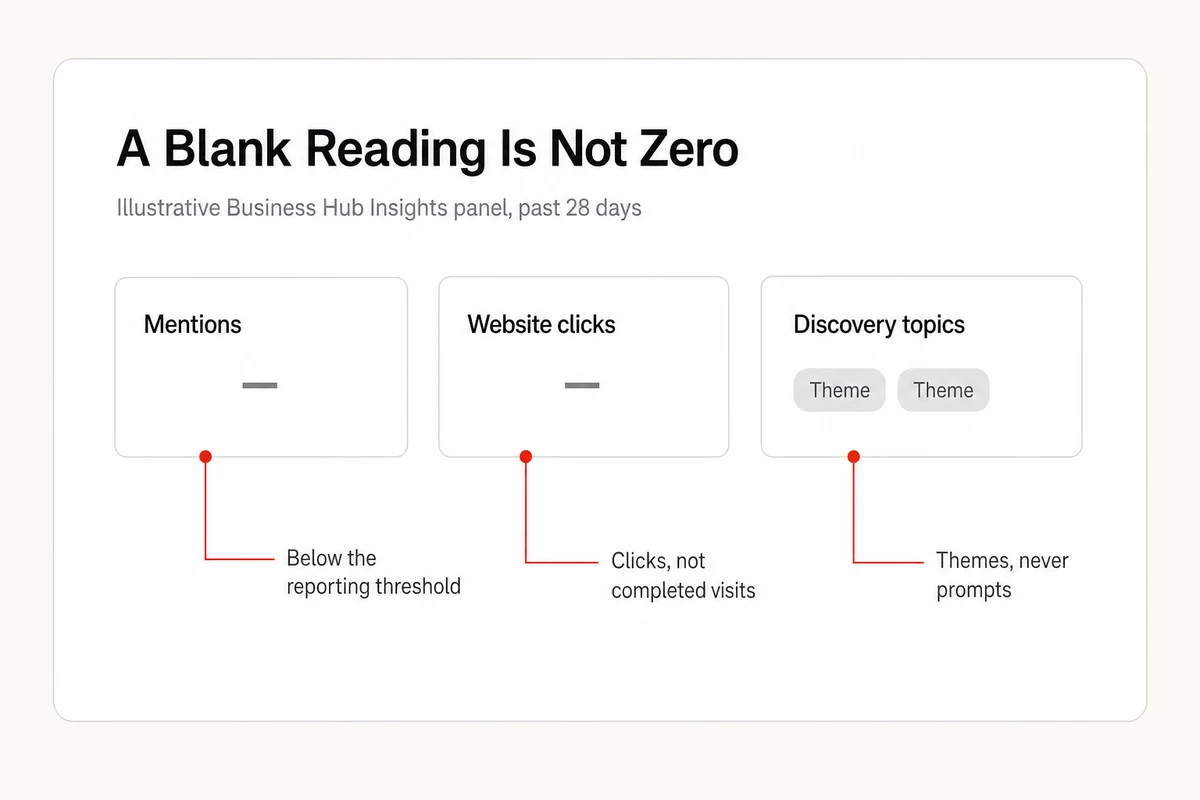
What's missing from the beta is as useful to know. There are no prompts and no share of voice, which an OpenAI spokesperson confirmed to Digiday, and nothing in the help article describes a view of competitors. You learn that you were shown. You don't learn the question, who else was named, or what ChatGPT said about you. Anyone tracking what ChatGPT says about a business still needs the answer text itself, and Insights doesn't hand that over.
Claiming Won't Make ChatGPT Recommend You More, and OpenAI Says So
OpenAI's help article asks whether claiming makes ChatGPT recommend a business more often, and answers that it doesn't guarantee increased visibility or give you direct control over ChatGPT's independent recommendations. The sign-up page repeats it, and the help article adds that advertising doesn't influence those answers either. At the press briefing, Digiday quoted Shomair saying that claiming a business shouldn't have "an impact on how frequently it appears".
He left one door open. Better information could help ChatGPT surface a business in more relevant conversations, since it would have a clearer picture of what the business offers. That's a point about accuracy, not rank, and it's the honest reason to claim. You get a say in the facts, a verified badge on the profile, and first-party counts no outside tool can produce. You don't get a hand on the shortlist, which by our read still runs through search, listings, and reviews.
So is it worth an hour? For a U.S. business with a website and an existing listing, yes. It costs nothing during the beta, and in our view claiming first beats disputing someone else's claim later. For everyone else, there's nothing to do yet except keep your records clean so the listing is right when the door opens.
Agencies Get Access, One Brand at a Time
The admin who claimed a business can add teammates in Business Hub and grant an agency access to manage the business or its agent, with each person on their own ChatGPT account. A business claimed inside a ChatGPT workspace may require invitees to be members of that workspace, and OpenAI tells agencies to contact support when an invitation is blocked. There's no agency console and no cross-client view. Every client is its own claim, its own verification, and its own Insights tab covering one assistant. Reporting across clients and across assistants is a separate job, and it's the one Lighthouse Local for Agencies is built around.
Claim the Profile, Then Keep Reading the Answers
Business Hub is the first record inside ChatGPT that an owner controls, and it's worth claiming for that alone. It's also one assistant, a 28-day window, and counts without the words. Lighthouse Local's AI visibility tracker asks ChatGPT, Gemini, Claude, Perplexity, and Google AI the questions your customers type, repeats them on a recurring check, and keeps each answer alongside its sources, so you can read what was said and who was named beside you. Whether crawlers can open and read your pages is a separate question, and a free AI audit scores that side with no account. Claim the profile so the facts are yours, then keep reading the answers, because the answers are what your customers see.
Frequently asked questions
Can I claim my business in ChatGPT?
Yes. Since November 10, 2026, an eligible business can claim its profile through Business Hub in ChatGPT. You search for the business, verify by phone, email, website domain, or Shopify, wait for OpenAI to approve the claim, then pass identity verification with Persona before you can publish edits or see insights.
Is it free to claim a business in ChatGPT?
Yes, for now. Digiday reported from OpenAI's launch briefing that Business Hub and Business Agents are free during the beta, and that OpenAI didn't rule out a paid model later. You don't need an ads account or an enterprise agreement to claim.
Does claiming my business make ChatGPT recommend it more often?
No. OpenAI says claiming doesn't guarantee increased visibility or give you direct control over ChatGPT's independent recommendations, and that advertising doesn't influence those answers. Claiming lets you manage the information you provide and see first-party counts.
Can a local business claim a ChatGPT profile?
Some can. OpenAI says local stores and restaurants can currently claim only an existing U.S. listing, and that claiming is initially available to eligible businesses with a website. If your business doesn't come up in the Business Hub search, a local business has no option to add it yet.
What does the blue check on a ChatGPT business profile mean?
It means the business passed identity verification with Persona. Claiming alone doesn't add the badge. OpenAI's help article says the blue check appears after your Persona verification is approved.
Why are my Business Hub insights blank?
A blank metric doesn't necessarily mean zero. OpenAI says it can mean activity hasn't reached the reporting threshold, data is still being collected, or reporting is unavailable. Insights cover the past 28 days and withhold low counts to protect user privacy.
Can an agency manage a client's ChatGPT business profile?
Yes. The admin who claimed the business can grant an agency access in Business Hub, with each person using their own ChatGPT account. Each brand is managed separately, and central management across brands and locations isn't currently available.