Being Recommended by AI Mode Is a Conversation You Have to Survive
To get your business recommended by Google AI Mode, your Google Business Profile has to win the first shortlist, a page on your site has to keep you on it when the customer names their neighborhood, your own site has to state your prices before AI Mode borrows someone else's, and your phone has to pick up when it hands your number over. That's the order because AI Mode doesn't pick once. It builds a new shortlist every time the customer answers one of its questions, and a business that was named in the first answer can be gone by the second.
That's what separates it from the other Google surface. An AI Overview is one summary on top of a results page, and our comparison of Google AI Overviews against AI Mode for local businesses covers how the two pick differently. AI Mode is a conversation, on a surface Google said crossed a billion monthly users in 2026, a figure that post also unpacks. For a local service business, a conversation means the customer gets asked where they live, what's broken, and whether they can wait, and each answer re-sorts the companies on the screen. This post is part of our series on getting recommended. It opened with the broad version, getting recommended by AI on any assistant. Then it went one assistant at a time, through getting recommended by the Gemini app and then by ChatGPT, and this one is where the recommendation moves the most, with Perplexity closing the series.
Four Questions About a Dead AC Unit in Tucson, Eight Companies Named
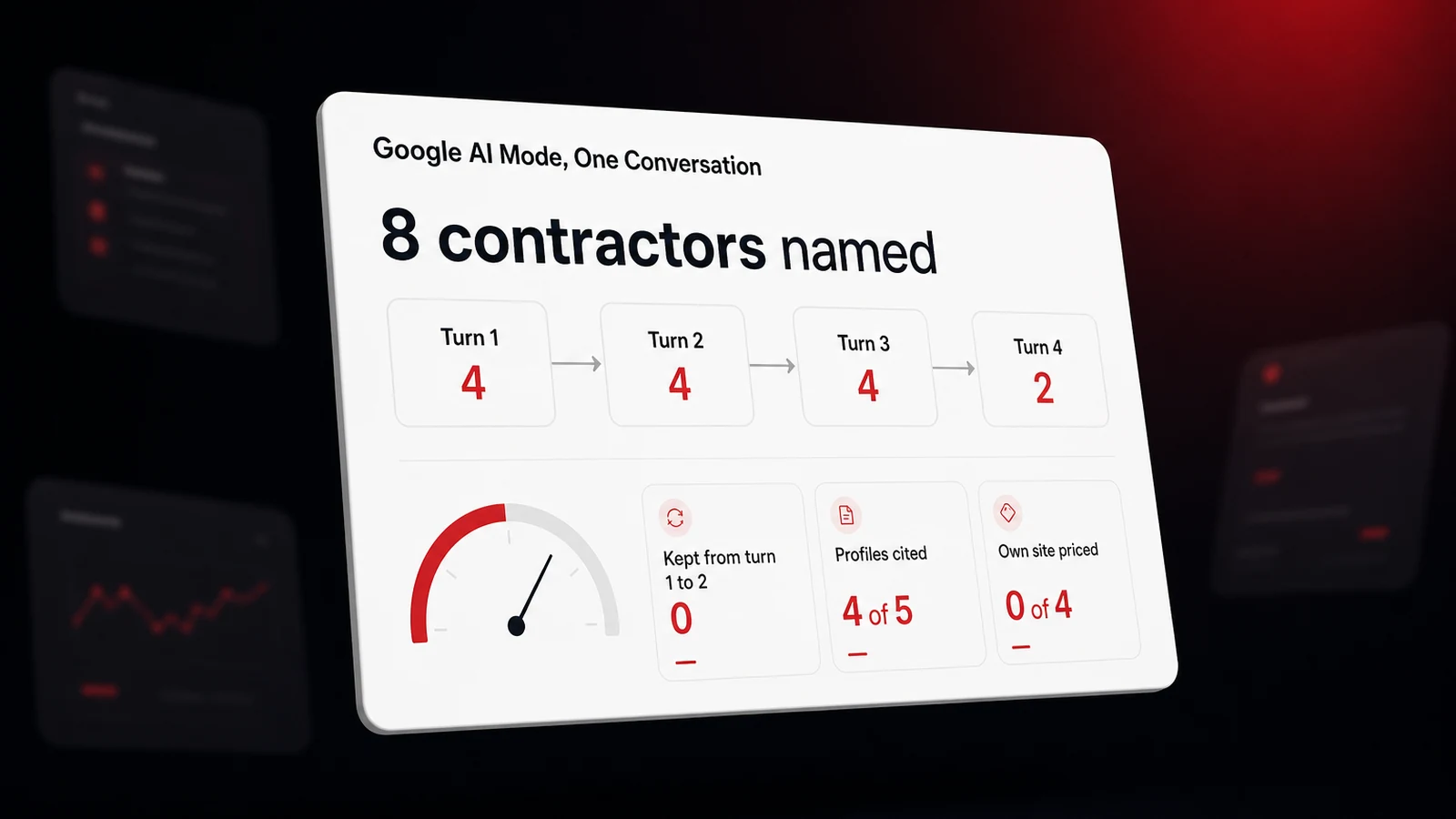
On October 22, 2026, we opened Google's AI Mode tab in a signed-out browser and asked it what a homeowner with a dead air conditioner would ask, then answered its questions the way that homeowner would. Four turns, one conversation, and no business name typed until the last turn, when we named one of the companies it had already picked. It's one conversation, one city, one trade, signed out, so the fixes that follow are ordered by what each turn read, not proven by it. Here's what each turn put on the screen. The companies are real Tucson contractors, lettered A through H so the pattern is the point rather than the names.
| Turn | What we typed | Companies named | Carried over from the turn before | What the answer leaned on |
|---|---|---|---|---|
| 1 | Who should I call for AC repair in Tucson, my unit stopped cooling | 4 (A, B, C, D) | Category, 24-hour hours, ratings of 4.9 or 5.0, review language | |
| 2 | Northwest Tucson near Oro Valley. The fan is blowing warm air. No warranty. | 4 (E, F, G, H) | 0 | Four Business Profiles and one neighborhood service page |
| 3 | It's humming outside. Which of these can come today, and what does a diagnostic visit cost? | 4 (E, F, G, H) in a comparison table | 4 | 21 Business Profiles, an Instagram post, a Yelp listing, and two other companies' fee pages |
| 4 | Yes. Can you call E and ask whether they have a slot this afternoon? | 2 (E, G) with phone numbers | 2 | The earlier turns, plus a tip drawn from each |
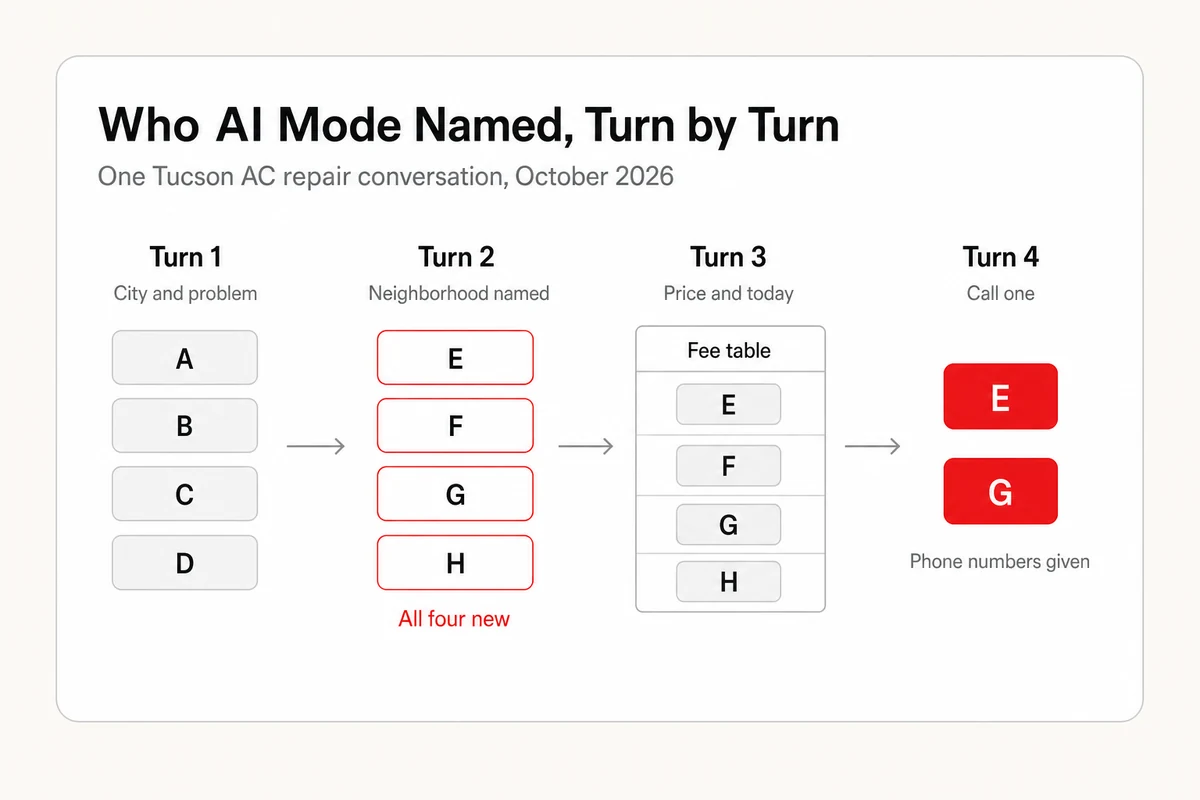
Eight companies were named across the conversation. None of the four from the first answer survived the second. By the end, two companies held the only phone numbers the customer was given. Each cut was shaped by what that turn read, mostly records a business controls and sometimes records it can only influence, which is why the rest of this post walks the turns in order and names the fix each one decides.
Turn One Picks From the Category, the Hours, and the Reviews
The first answer opened with a sentence saying to call a 24-hour emergency HVAC service, then showed four business cards under a heading about 24/7 emergency AC repair. Every card carried the same parts. A star rating, a review count, a category label, an open-or-closed status, an address line, a Call button, a Website button, and one or two sentences about the company. The ratings ran 4.9, 5.0, 4.9, and 4.9. The review counts ran from 707 to 2,800. All four showed open 24 hours. The category labels were Air conditioning repair service for one and HVAC contractor for the other three, which are Business Profile categories, not words from anyone's website.
The sentences under each card are where the reviews showed up. One said the company was praised for arriving in under 30 minutes on weekends or early mornings. Another said it was known for getting systems back online within an hour of arrival. A third mentioned upfront pricing, and the fourth same-day or next-morning scheduling. Those are the kinds of specifics customers write in reviews, rewritten into a recommendation. Google's September 2025 note for developers describes its Gemini-powered review summaries for places as capturing the top themes from user reviews, and the line under each AI Mode card is similar in kind, though that note covers the Maps API and says nothing about AI Mode. A company whose reviews only say great service has nothing for that line to quote.
Review count seems to matter more than a perfect score, in a published measurement of AI Mode's picks. In 2026, the UK research publisher Whito checked 3,149 local businesses across eight trades and found that the ones AI Mode named had a median of 140 Google reviews, against 61 for the rest of the top 20. Of businesses with fewer than ten reviews, 6 percent were named, against 31 percent of those with 250 or more, and businesses at 4.8 or 4.9 stars were named more often than businesses with a perfect 5.0. That's UK data from one phrasing of the question, and the author frames it as an association rather than a cause, since AI Mode and the map draw on the same profiles. But it fits what we saw. The four first-turn cards had 707, 749, 1,800, and 2,800 reviews, and only one of them had a 5.0. How reviews shape AI recommendations goes through earning reviews like that without scripting them.
Three more things sat on that first screen. A map with pins, one of them for a company that got no card. A sponsored result for a company outside the four, below the AI answer, so ads reach AI Mode too. And three questions back at us. Which part of Tucson, whether the fan was still blowing, and whether the unit was under warranty. That last part is the tell. AI Mode wasn't finished choosing. It was gathering what it needed to choose again.
Turn Two Throws Out the List When the Customer Says Where They Live
We answered that we were in northwest Tucson near Oro Valley, that the fan was blowing warm air, and that there was no warranty. The second answer named four companies, E through H, and not one of them had appeared in the first. The answer said why in its own words, that these companies were based along the N Oracle Road corridor or heavily served the northwest area. Two of the four cards showed only Tucson, AZ where the others showed a street address, and they were named anyway. One card noted the company ran daytime hours only and recommended it for anyone who could wait until morning, so an honest hours field didn't cost that business the mention.
The sources panel for that answer listed five items. Four were Google Business Profiles, one per company named. The fifth was a page on Contractor F's website whose title named 24/7 HVAC service in Oro Valley, the neighborhood we'd just typed. That's a page built for one part of town, and it was the only website AI Mode cited in the whole turn. A wider measurement points the same direction. Search Engine Journal reported in July 2026 that google.com had become the second most cited domain inside AI Mode in Profound's data, with almost all of the growth going to Business Profile cards and product panels. Here, the profile earned the card, and a page naming the customer's neighborhood was what got a website into the footnotes.
So the second fix is a geographic one, and it has two halves. In the Business Profile, set the service area to the places you drive to, by city and neighborhood, not one radius. On the site, give each area you serve its own page that says the area's name in the title and the first sentence, with the services and the response time for that area. Why AI recommendations differ by user covers the location half of this from the customer's side. A customer who says Oro Valley gets an Oro Valley list, and you're on it only if a record somewhere says you go there.
Turn Three Quotes a Price, and It Wasn't the Companies' Own
We said the outdoor unit was humming and asked which of the four could come today and what a diagnostic visit costs. AI Mode answered with a table. Four rows, one per company, with a column for whether they could come today, a column for the diagnostic fee, and a column of notes. Three rows said yes with 24/7 dispatch. The fourth said call for openings, 8 to 5. The fee column read as ranges, roughly 77 to 99 dollars across the four, each with a tilde in front of it. The notes said one company often waives the diagnostic fee if you go ahead with the repair, and that some reviewers felt another company's repair quotes ran high. Then it estimated the repair itself at 150 to 300 dollars for a capacitor.
Then we opened the sources and expanded the full list. It ran to 25 entries. Twenty-one were Google Business Profiles, covering 18 companies, the four in the table among them. Four were web pages, and not one belonged to the four companies being priced. There was an Instagram post about typical HVAC diagnostic fees, Contractor F's Yelp listing, where it held 2.3 stars across 128 reviews against 4.8 stars across 4,100 on Google, and two fee pages from Tucson companies never named in the conversation, one quoting a 95 dollar service call and the other a flat 99 dollar diagnostic. AI Mode had built a price table for four businesses out of a social post, a directory listing, and two other companies' rate cards.
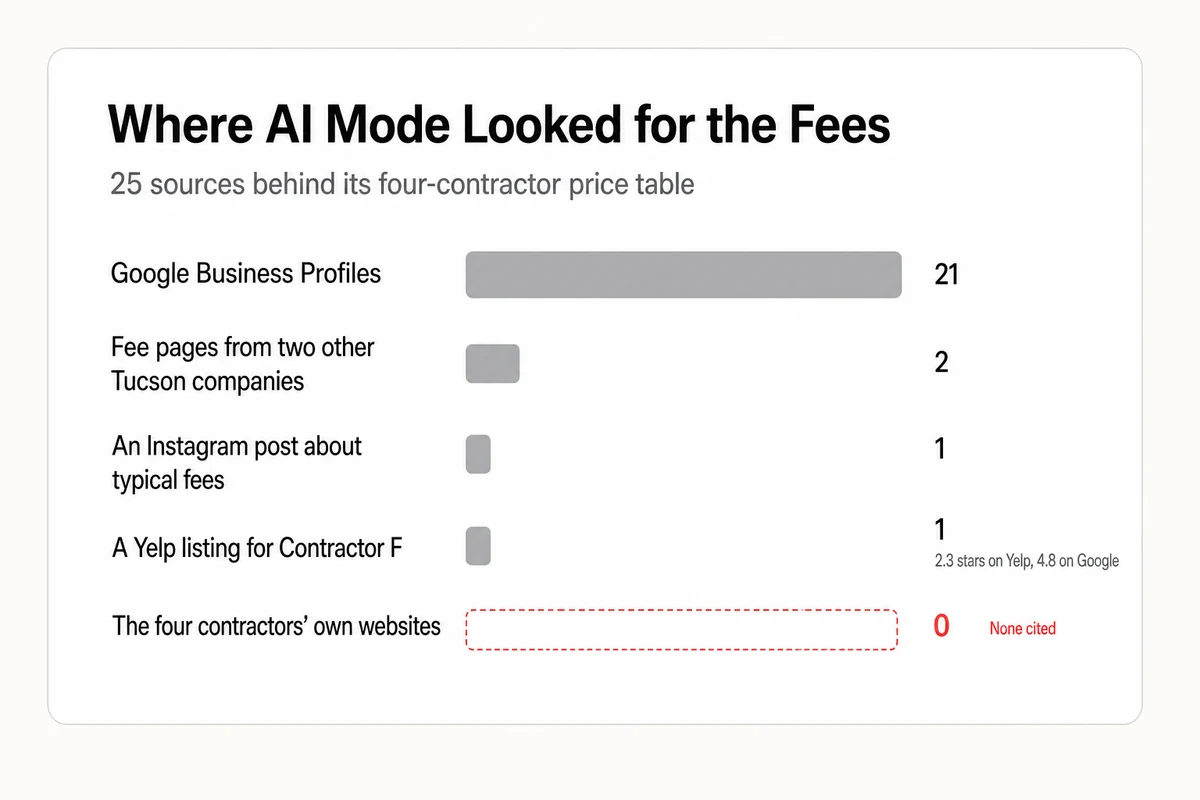
The fix is to put the number where AI Mode will find it before it goes looking elsewhere. Publish your diagnostic or service-call fee on your own site in plain text, say whether it's waived with a repair, and say the after-hours rate if there's one. A customer in a conversation like this one was going to see a dollar figure next to your name either way. The only question was whose. The same goes for the directory it read for the complaint. Whether directory listings affect AI visibility is a fair question for most of them, and the answer here was that one listing with a low rating fed a note in a table that sat beside a 4.8 on Google.
Turn Four Ends With Your Phone Number, or Someone Else's
We asked AI Mode to call Contractor E and check for an afternoon slot. Signed out, it said it couldn't make calls on our behalf, and then it did the next thing. It gave us phone numbers for two of the four, E and G, each with a tip. For E, mention you're near Oro Valley in case a truck is already in the area. For G, ask whether the waived-fee special is running. Both tips came from the earlier turns. The conversation that had started with four names ended with two numbers, and the customer never saw a website.
In Google's own rollouts, that last step goes further. In August 2025, Google started rolling out agentic features in AI Mode, beginning with finding restaurant reservations across booking sites and naming local service appointments as the next expansion, with partners such as OpenTable, Resy, Tock, and Booksy. In October 2026, Local Falcon reported that Google was testing a Gemini feature that calls local businesses on behalf of customers, and points to a Google opt-out page for businesses that don't want those Gemini calls. Separately, Google's Business Profile help describes a setting for automated calls in general. It says that when a customer makes a request, Google might contact your business on their behalf through an automated phone call, and that a verified business can switch those calls off under Advanced settings. That page never says AI Mode or Gemini by name, so it's the general switch, not a promise about either feature.
So the fourth fix is the cheapest and the one most businesses fail without knowing. The number on your Business Profile has to be the one a person answers, including after hours if your profile says you're open after hours, and the booking link has to work on a phone. Our guide to fixing a wrong phone number in AI answers covers what to do when the number AI Mode hands out is one you stopped using.
The AI Mode Fix List, Ordered by the Turn That Decides It
Here's the whole list, in the order the conversation applies it. Each fix names the turn it decides and the record it lives in.
- Pick the category customers hire you for, and list every service. Turn one, Business Profile. Air conditioning repair service and HVAC contractor both made the first list. A category that doesn't match the job gives it no reason to.
- Keep hours exact, including after hours. Turn one, Business Profile. Every first-turn card showed 24 hours, and the one daytime-only company in turn two was still named, with an honest note. A wrong hours field is worse than a short one.
- Earn reviews that describe the job. Turn one, Business Profile. Arrival time, the day of the week, what was fixed. Those sentences became the recommendation line.
- Set the service area by neighborhood. Turn two, Business Profile. The second list was built from where the customer said they were.
- Build one page per area you serve. Turn two, your website. The only site cited in that turn was an Oro Valley page.
- Publish your fee and your waive-with-repair policy. Turn three, your website. Otherwise the table quotes an Instagram post and other companies' rate cards.
- Claim the directory listings AI Mode reads for the money question. Turn three, Yelp and its peers. A 2.3 there showed up beside a 4.8 on Google.
- Answer the number on the profile. Turn four, Business Profile and your front desk. Decide too whether you want Google's own calls to reach you.
Five of the eight live in the Business Profile, which is why the profile is where to start. If you want someone else to do this work, Lighthouse Local's specialists handle profile management, service-area pages, and the on-page work through Lighthouse Local for Business, with each change signed off by you.
Replay the Conversation for Your Own Trade
You can run this test for your own business in about fifteen minutes, and the point is to run it as a conversation, not a single search.
- Open a private window, go to Google, and choose the AI Mode tab. Don't sign in.
- Ask the first question the way a customer with the problem would, with the service and the city and never your name. Count the cards and note whether you're one.
- Answer whatever it asks back, using a neighborhood you serve. Count again, and write down who dropped out and who came in.
- Ask which of them can come today and what the visit costs. Open the sources and note whether your own site is in them, and whose price it quoted.
- Ask it to book or call one. Note which numbers it hands over.
Keep the four questions the same and run them once a month, because the lists move between runs. For a standing weekly check, Lighthouse Local's AI visibility tracker asks a set of single customer questions on a schedule and tallies which businesses each assistant we track named, Google AI included, so the trend shows up without a calendar reminder. It doesn't replay AI Mode conversations or the follow-up turns, so the four-turn run stays a hand check, and it's the one where you can watch the cut happen.
Every Follow-Up Is a Fresh Shortlist
AI Mode recommended eight Tucson contractors in one conversation and kept two. The two it kept were the two it had offered to connect us with a turn earlier, and one run can't say exactly why those two. What one run can show is which record each turn read. A profile filed under the right category, a page naming the customer's part of town, a published fee, and an answered phone are the four places that reading happens, and a business absent from one of them gives the next turn nothing to pick. For the website half, a free AI audit checks the on-site signals and returns fixes in ranked order with no signup. The profile half starts with the eight items above. Win the first list, then keep answering the questions the customer is going to be asked.
Frequently asked questions
Does Google AI Mode recommend local businesses?
Yes. For a local service question, AI Mode shows business cards drawn from Google Business Profiles, with a rating, review count, category, hours, address, Call and Website buttons, and a sentence or two drawn from reviews. In our Tucson test it named four contractors on the first turn and four different ones on the second.
Why did AI Mode name different businesses after I answered its question?
Because each answer in the conversation is a new shortlist. When we told AI Mode which part of town we were in, it rebuilt the list from companies whose profiles and pages matched that area, and none of the first four carried over. Your service area in the Business Profile and a page per neighborhood on your site are the records that second list read.
Where does AI Mode get the prices it shows for local services?
From whatever it can find. In our test the diagnostic fees it quoted for four contractors came from an Instagram post about typical fees, a Yelp listing, and fee pages from two companies never named in the conversation, alongside 21 Business Profiles. None of the four companies' own sites was cited. Publishing your fee on your own site is how you give it your number to quote.
Can Google AI Mode call my business on a customer's behalf?
Signed out, in our test, AI Mode said it couldn't make calls and handed over phone numbers instead. In its own rollouts, Google has added agentic features to AI Mode since August 2025, starting with reservations, and in October 2026 it was testing Gemini calls to local businesses on a customer's behalf. Google's Business Profile help says a verified business can turn automated Google calls off under Advanced settings.
How do I check whether AI Mode recommends my business?
Open the AI Mode tab in a private window, ask the question a customer with your kind of problem would ask with the city but not your name, then answer the questions it asks back with a neighborhood you serve, ask about price and availability, and ask it to call one. Note who's named at each step and whose site it cites. Repeat monthly.