A Snapshot Nobody Can Edit, Patched by a Search That Reads Copies
ChatGPT has outdated information about your business because it draws on two layers, and both can be old. The first is the model itself, trained on a snapshot of the web that stops at a fixed date months before you ask. The second is its web search, which reads indexed copies of pages and third-party listings rather than your live site, and only when it decides a question needs it. If it answers from the snapshot, you get whatever the web said about you before the cutoff, or a confident guess when it never saw you at all. If it searches, you get whatever the directories, review sites, and cached pages say today, which is current only if those records are.
That split is why the same stale claim can have four different causes, and why the fix depends on which one you're looking at. An old address can come from a training snapshot, from an index copy that predates your move, from a Yelp or Bing listing nobody updated, or from your own footer, which still says the old street while your contact page says the new one. The rest of this post covers a real test on our own business, then shows how to tell the four apart in about ten minutes and what corrects each. The honest part up front is that one of the four, the model's memory, can't be edited by anyone outside OpenAI. It can only be outlasted, and outlasting it means making sure every search it runs finds the same fresh fact.
We Asked GPT-5.5 About Our Own Business, Search Off and Then On
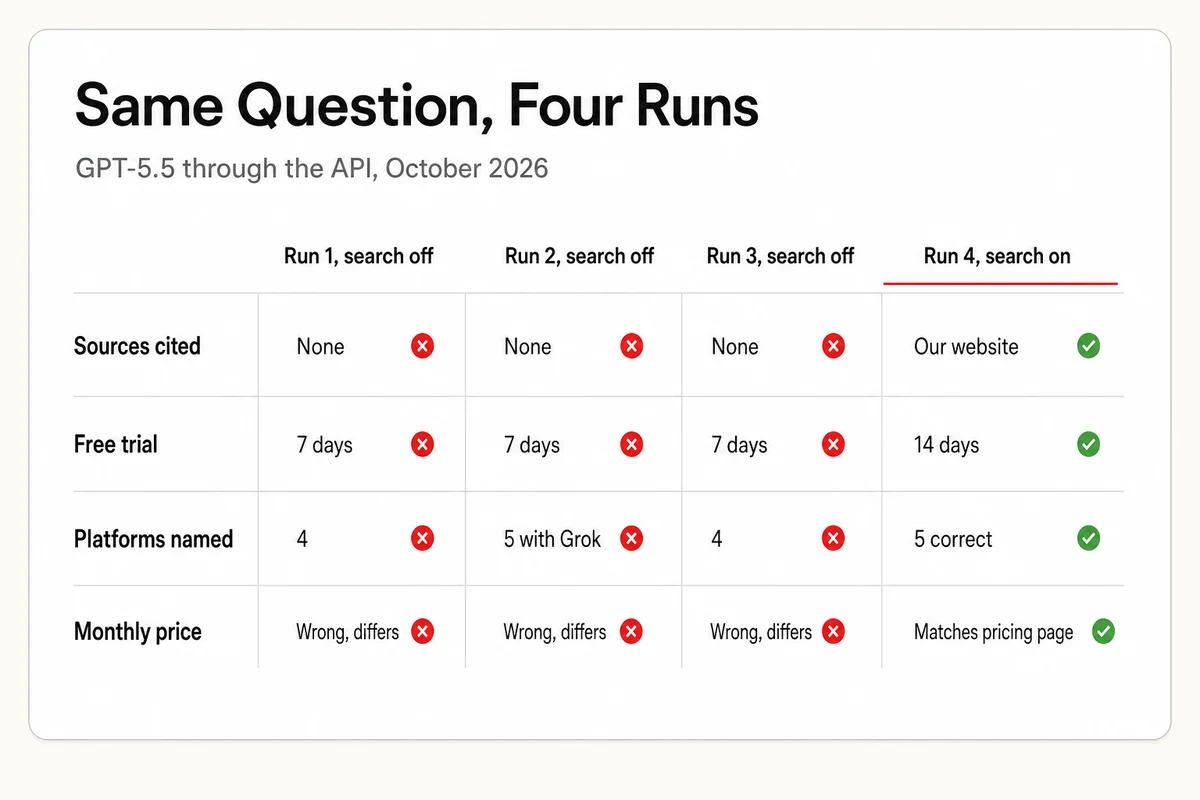
In October 2026 we ran a small test, four runs of one question put to GPT-5.5 through OpenAI's API, which lets you switch web search off and on cleanly, so this is the API model rather than the ChatGPT app. The question asked what Lighthouse Local is, what it costs per month, how long the free trial runs, and which AI platforms it tracks. OpenAI's model page lists GPT-5.5 with a knowledge cutoff of December 1, 2025, so with search off the model was answering from a snapshot about ten months old.
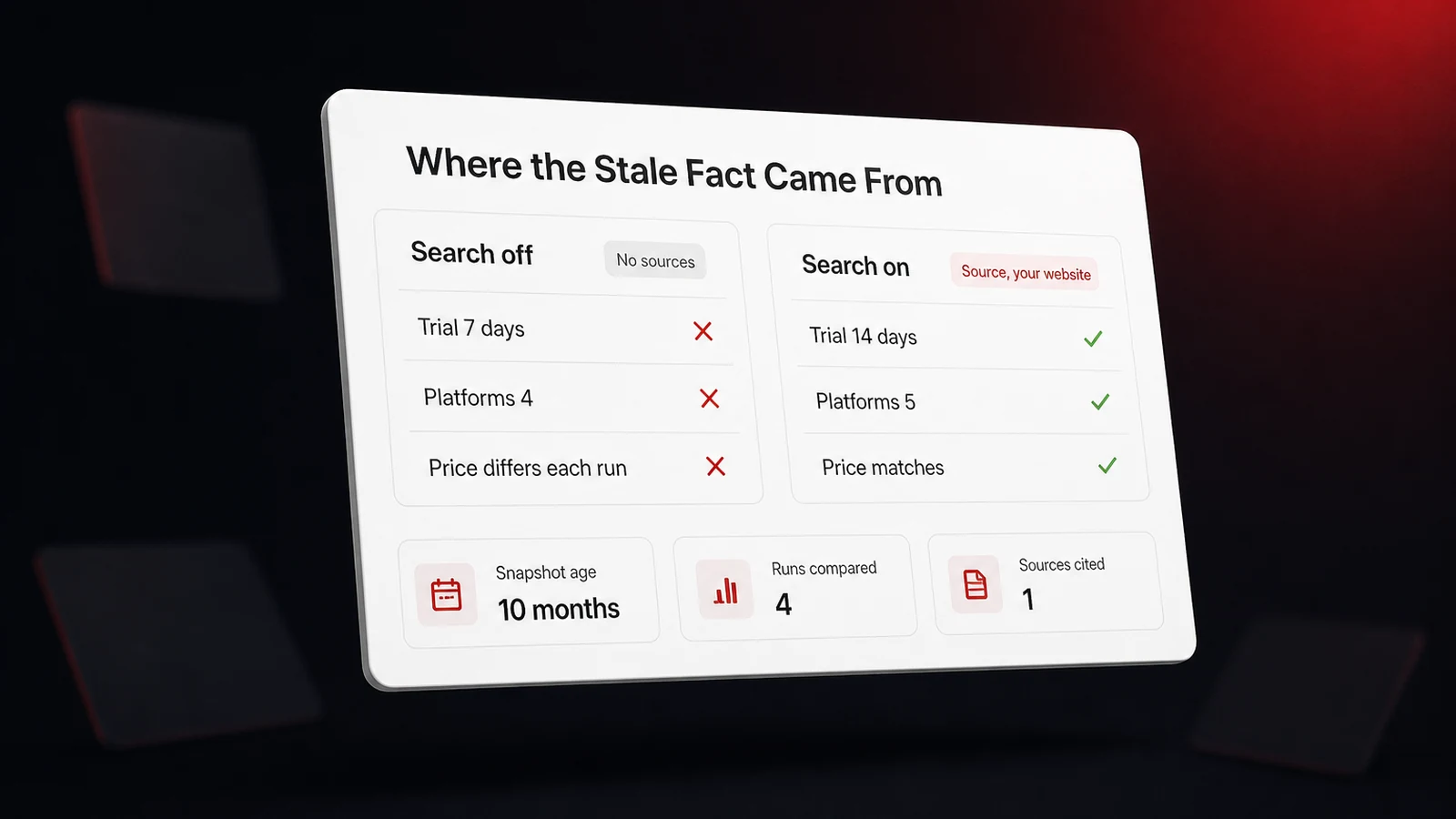
With search off, we ran the question three times. Every run described what we do correctly in general terms, then invented the specifics. Each run gave a different monthly price, none of them a figure on our pricing page. All three said the free trial was 7 days. The real trial is 14 days. The first and third runs named four platforms instead of five, and the second named five but swapped Google AI out for Grok. Nothing was cited, because nothing was read. The numbers moved between runs, which points to the model filling a gap rather than remembering a stale record, the likely outcome when a business is too small or too new to have left a mark in its training data. That failure is invention rather than staleness. A business the model did see before its cutoff gets the other failure, an old fact repeated with the same confidence, and both come from the same frozen snapshot.
With search on, one run was enough. The model fetched our homepage, cited it, and got the trial length, every platform by name, and every plan price right. Same model, same question, same minute. The only variable was whether it read a live page or reached into its memory.
Our case is the small-business version of a pattern others have measured at scale. In August 2026, LLM Listed tested 250 companies across four assistants and found that 23 percent of pricing answers contained specific figures that looked speculative, 5 percent of responses confused the company with a different business, and local businesses were four times as likely as national brands to be materially misunderstood. A model that has barely seen you fills the blanks, and it fills them with numbers.
Four Sources, Four Different Ages
Every fact ChatGPT states about a business comes from one of four places, and each one goes stale on its own schedule. Knowing which one fed the bad claim is most of the fix.
| Where the fact came from | How it goes stale | How old it can be | The tell |
|---|---|---|---|
| The training snapshot | Frozen at the model's cutoff and never updated | Months, ten in our test | No sources shown, and the numbers shift between runs |
| The search index copy | A stored copy of a page, refreshed on the index's own schedule | Days to weeks | Your own page is cited, but with a fact you already changed |
| Third-party records | Yelp, Bing Places, Apple, Facebook, and directories each update separately | Weeks to years | The cited source is a listing, not your site |
| Your own website | Footer, contact page, schema, and an old PDF disagree with each other | Until someone fixes it | The stale fact is on your site right now |
The training snapshot. OpenAI's models index lists a knowledge cutoff for each model, and every cutoff sits months behind the day you ask. Researchers who benchmarked this in November 2025 described the cutoff as a strict boundary beyond which a model can't be accurate without outside sources, and warned that unnoticed, a model may blend outdated time-sensitive information with general knowledge. The confidence is a separate problem with its own paper. A September 2025 paper co-authored by OpenAI researchers argued that training and evaluation reward guessing over acknowledging uncertainty, which is why our three no-search runs each produced a crisp price instead of saying they didn't know.
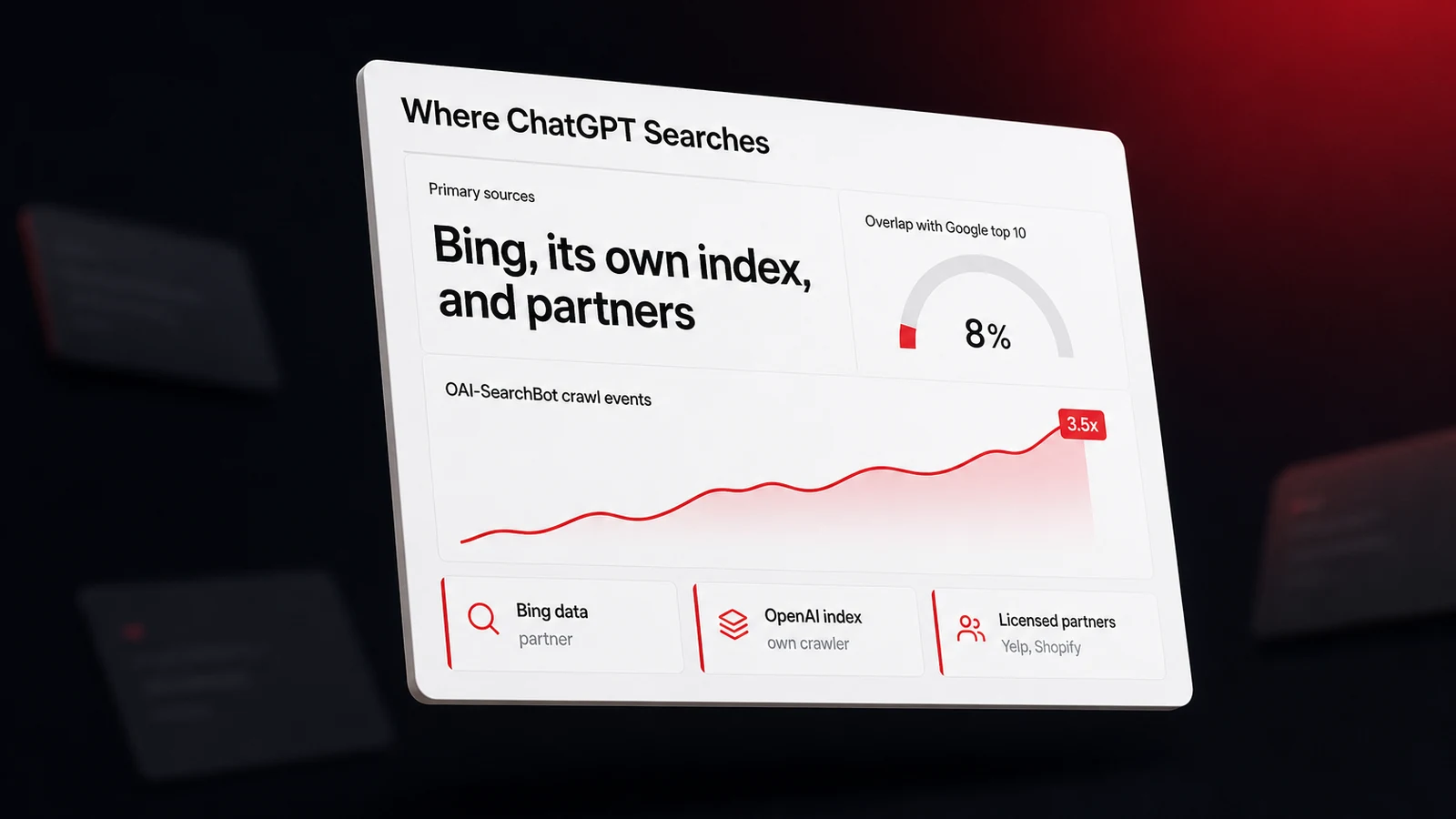
The search index copy. When ChatGPT does search, it reads from Bing's data and from OpenAI's own crawled index, and our explainer on where ChatGPT's search results come from walks through OpenAI's own description of serving indexed and cached web content. A copy is only as fresh as its last fetch. If you changed your hours on a Tuesday and the index last read that page in August, a searched answer can cite your page and still state the August hours.
Third-party records. Listings carry a large share of the facts. In October 2025, Yext analyzed 6.8 million citations across three assistants and found that 44 percent pointed to first-party websites and 42 percent to listings. The mismatches in those listings are measurable. In December 2025, Seer Interactive asked seven models for 178 brands' phone numbers and found that ChatGPT's answer matched the brand's customer-service page 68 percent of the time, the lowest of the seven, that only 27 percent of answers matched the Google Business Profile number, and that 59 percent of the citations were third-party sites. Insites ran the local version in July 2026 against 10,000 US businesses and found ChatGPT gave the wrong phone number for 30.09 percent of the businesses it identified and the wrong website for 15.59 percent, with every detail matching the Business Profile for just 55.58 percent. Closed status ages the same way. Birdeye's March 2026 comparison of more than 2,400 searches across maps, directories, and six AI models reported that several platforms showed closed clinics and restaurants as open, with errors more common in suburban and rural areas where the data runs thin.
Your own website. This is the cause owners check last and should check first. In September 2026, Herringbone hand-graded 1,200 AI answers about 600 small businesses against each business's own site. ChatGPT was accurate 89 percent of the time when the site stated the fact clearly and 73 percent when the site was vague or silent. Only 55 percent of the businesses published their hours consistently across the contact page, the footer, and the structured data, and a 24/7 phone line or a 24-hour setting on the Business Profile was misread as opening hours in 21 percent of ChatGPT's answers. When your site disagrees with itself, the assistant picks one version, and it has no way to know which one is the old one.
Ten Minutes to Find Which Source Went Stale
You can sort a stale claim into one of the four buckets with a temporary chat and one prompt, because each cause leaves a different fingerprint. Open a temporary chat so your own past conversations don't color the answer, then paste this with your details filled in. Treat the result as a rough sort rather than a verdict, since the assistant may search anyway or guess at the memory half, and if you want a cleaner split, run the two halves in two separate temporary chats so the first answer can't shape the second.
First, without searching the web, tell me everything you know about [Business Name] in [City]:
hours, address, phone number, whether it is currently open, and what it charges.
Label that section FROM MEMORY.

Then search the web and answer the same questions again.
Label that section FROM SEARCH, and for every fact give the page it came from and the date on that page.

Finally, list every fact that differs between the two sections.
Read the result against the table above. If the memory section is wrong and the search section is right, the stale fact lives in the training snapshot, and a customer who asks without triggering a search is the one who gets it. If both sections agree on the wrong fact, look at the cited page. A directory or review site means a third-party record. Your own domain means either the index copy is old or your site still carries the fact somewhere, so open the cited page in a private window and search it for the stale value. If you find it, the problem is yours to fix today. If you don't, the index is behind and your job is to make the fresh version easy to recrawl, which our post on how quickly AI picks up website changes covers lever by lever.
Run the prompt more than once before you conclude anything. In September 2026, BrightLocal ran 200,875 non-branded local prompts over 60 days and found that repeat runs of the same ChatGPT prompt overlapped on just 23 percent of the businesses they named. A fact that appears in one run out of three is a guess. A fact that appears in three out of three, with the same source cited each time, is a record you can go and correct.
Fix Hours, Status, and Address Where the Search Will Read Them
Two of the four causes are records you control, and both get fixed the same way, by making the fresh fact identical everywhere a search might land. Our walkthrough of auditing what AI claims about your business covers the full sort-and-correct method. The items below are the ones that produce stale answers most often.
- Set the closed status on every platform, not just the hours. A business that's actually closed, moved, or seasonal needs the status set, not just the hours blanked. Google's help page on marking a business as closed says to use Temporarily closed for any closure longer than 7 days or with no end date, special hours for 7 days or less, and warns that a permanently closed profile may still appear in Search and Maps for people who search for it. Yelp's business support lists temporary closure details and operating hours among the fields an owner edits in the Yelp for Business app. The reverse error, a reopened or relocated business still marked closed, is the one that costs sales, so check status on every listing after any change.
- Make Apple, Bing, and Facebook agree with your site. Apple's guide to location attributes says the hours on your place card need to match the hours published on your official website and that the status field is what tells customers whether you're open. Microsoft's support page sends owners to Bing Places for Business to claim or update a listing, which matters because Bing's data is one of the feeds behind ChatGPT's search. Facebook's help center walks through changing business hours on a Page and notes that the time zone follows the Page's location, so a wrong pin produces wrong hours.
- Kill the duplicate profile. A second Google listing carrying the old address is a stale record in its own right. Google's page on resolving duplicate profiles states that a business may have only one profile, that duplicates are against policy, and that a merge request is reviewed and combines the reviews.
- Give your site one source of truth for hours. Put hours in the raw HTML of one page and mark them up so a crawler can read them as data. Schema.org's OpeningHoursSpecification carries the day, the opening and closing times, and valid-from and valid-through dates, and specialOpeningHoursSpecification explicitly overrides the regular hours for a holiday or a short closure, so the holiday week never has to be hand-edited into the regular schedule and forgotten there.
<script type="application/ld+json">
{
  "@context": "https://schema.org",
  "@type": "LocalBusiness",
  "name": "Your Business Name",
  "telephone": "+1-555-555-0100",
  "url": "https://yourdomain.com/",
  "openingHoursSpecification": [
    {
      "@type": "OpeningHoursSpecification",
      "dayOfWeek": ["Monday", "Tuesday", "Wednesday", "Thursday", "Friday"],
      "opens": "08:00",
      "closes": "18:00"
    },
    {
      "@type": "OpeningHoursSpecification",
      "dayOfWeek": "Saturday",
      "opens": "09:00",
      "closes": "14:00"
    }
  ],
  "specialOpeningHoursSpecification": {
    "@type": "OpeningHoursSpecification",
    "dayOfWeek": "Thursday",
    "opens": "00:00",
    "closes": "00:00",
    "validFrom": "2026-11-26",
    "validThrough": "2026-11-26"
  }
}
</script>
Then hunt the contradictions. Search your own site for the old phone number, the old street, and the old closing time, including PDFs, image captions, and the footer template that every page inherits. Herringbone's finding that only 55 percent of small businesses kept their hours consistent across their own pages is the single most fixable number in this post, and the fix takes an afternoon. If you'd rather not spend the afternoon, Lighthouse Local for Business has specialists who handle listings, on-page work, and Google Business Profile management as a done-for-you service you approve and they carry out.
The Part You Can't Correct, and How to Outlast It
There's no form where a business submits a correction to a trained model, and we found no OpenAI-documented channel for one, so the training snapshot stays wrong until the next model ships with a later cutoff. Three things make that less frightening than it sounds.
First, the snapshot only answers when the model skips the search. A question with a current-events feel, which includes hours, prices, and whether a place is open, is the kind of question that tends to trigger a search, and a searched answer reads records you can fix. In our test the searched answer was right on every count while three memory-only answers were wrong on price, trial length, and platform list. Second, what the snapshot holds about a small business is usually thin, so the model guesses rather than recalls, and a guess is overwritten the moment a search returns a real page. Third, the model's picture of you is only one of several layers in what a customer sees, since each person's own ChatGPT memory and location shape the answer too, and our post on why AI recommendations vary by user explains how to test as a stranger would see you.
So the strategy for the layer you can't touch is to make the layers you can touch unanimous. When every listing, your site, and your schema state the same hours, the same address, and the same status, every search the model runs lands on the fresh fact, and the snapshot becomes a memory it never has to use. The business most exposed is the one whose records disagree, because then the model has permission to pick, and it picks with confidence. A bookshop in Willoughby, Ohio learned that in 2026 when Google's AI summary labeled it permanently closed within a year of its opening. The co-owner told Hoodline the mistake cost a month of almost no sales, and Google's explanation was that its summaries can amplify outdated or conflicting signals from source sites. That was Google's assistant rather than ChatGPT, and the mechanism is the same for every assistant we track. Conflicting records are an invitation to be wrong about you.
Make the Fresh Fact the Only Fact Anywhere It Looks
The short version of why ChatGPT has old information about your business is that it carries a memory with a date on it and reads copies of records other people maintain. You can't edit the memory. You can make every record it reads say the same current thing, and you can check your own site first, since that's where the contradictions that mislead a crawler most often start. A free Lighthouse Local audit scans your site's on-page signals, including the structured data above, and hands back a prioritized list of fixes, no signup needed. Then watch whether the answers catch up, because a fix you made this week shows in a searched answer over the following weeks, and only a repeated check tells you when. Our AI visibility tracker puts your customers' questions to ChatGPT, Gemini, Claude, Perplexity, and Google AI on a recurring schedule and logs what each one says about you, so what each one says about your hours and status is on record to compare against your own. Fix the records, then let the next month of answers tell you the snapshot stopped mattering.
Frequently asked questions
Why does ChatGPT say my business is closed when it's open?
Usually because a record it read says so. A listing on Yelp, Bing Places, Apple, Facebook, or a directory may still carry a temporary or permanent closure from an earlier period, or a duplicate Google profile may hold the old status. Less often the model is answering from its training snapshot, which ends months before the question. Ask it to search and cite its source, then correct the status on whichever record it names, and set the status field on every other listing to match.
Can I correct what ChatGPT says about my business?
Not inside the model, and we found no OpenAI-documented channel for a business to submit a correction to a trained model. What you can correct is every record its search reads, which is your own website and structured data, your Google Business Profile, and your listings on Yelp, Bing Places, Apple, and Facebook. When those agree, a searched answer states the current fact, and the training snapshot is only used when the model skips the search.
How long does it take ChatGPT to update my business hours?
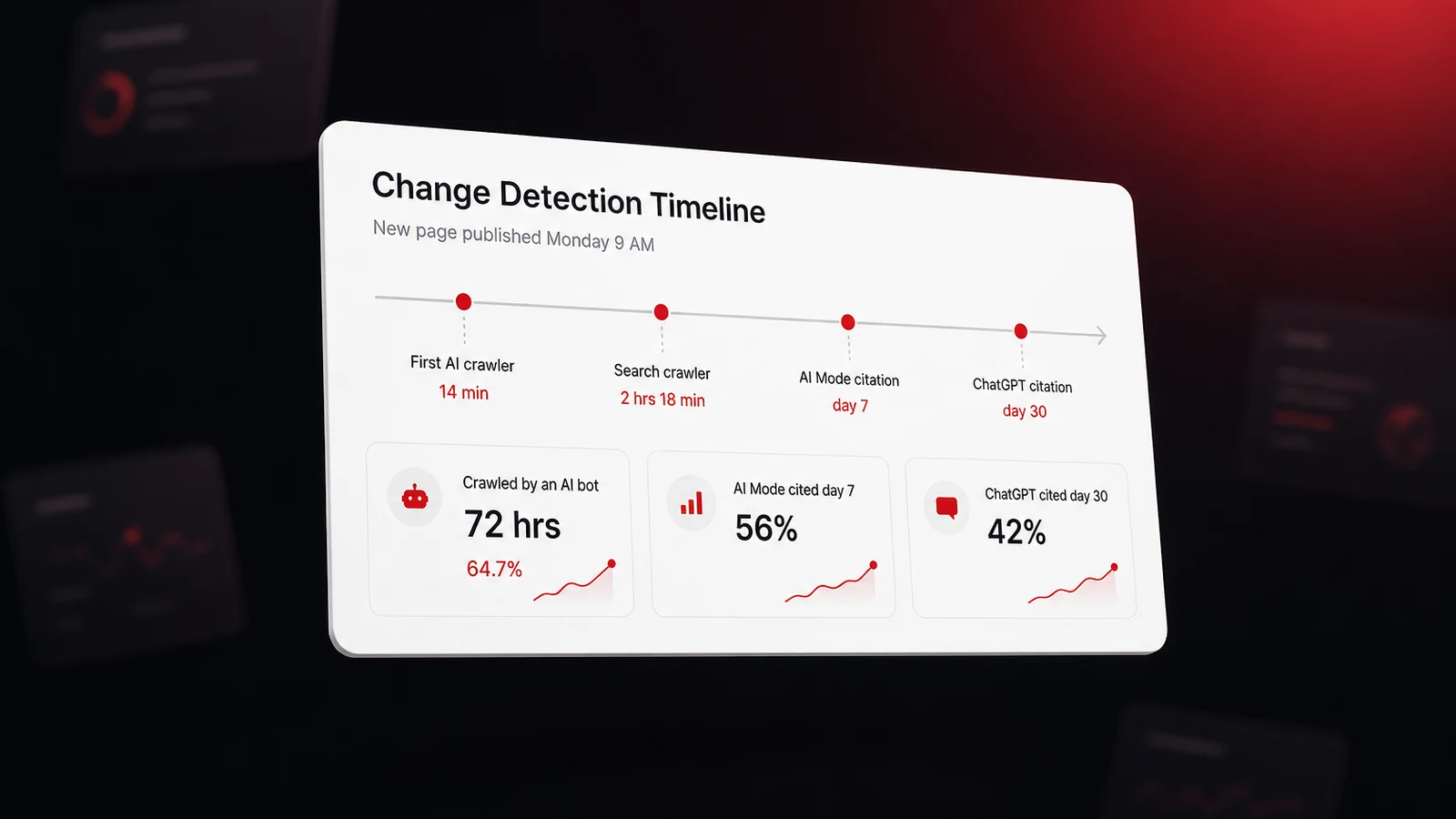
There's no fixed interval. A change on your site has to be recrawled into the index ChatGPT searches, which can take days to weeks, and a change on a listing has to be picked up from that listing. The training snapshot itself never updates until a new model ships. Make the change everywhere at once, keep the hours in plain HTML and in OpeningHoursSpecification markup, and re-ask the question weekly in a temporary chat until the searched answer matches.
Does ChatGPT read my Google Business Profile?
Indirectly. ChatGPT's search draws on Bing data, OpenAI's own crawled index, and licensed partners including Yelp, so it reaches your Google profile only as a public web page rather than as a direct feed. Seer Interactive found that only 27 percent of the phone numbers assistants gave matched the Google Business Profile number, which is why the profile needs to agree with your site and your other listings instead of being the only place you keep facts current.
Why does ChatGPT give a different answer about my business each time?
Because when it answers from memory about a business it has barely seen, it's guessing, and guesses vary. Our three no-search runs each produced a different price for our own product. BrightLocal measured the same instability in local answers, with repeat runs of one ChatGPT prompt overlapping on just 23 percent of the businesses named. A fact that's stable across runs and cited to the same page is a record you can go and fix.