Four Kinds of Negative, and Only One Is a Legal Matter
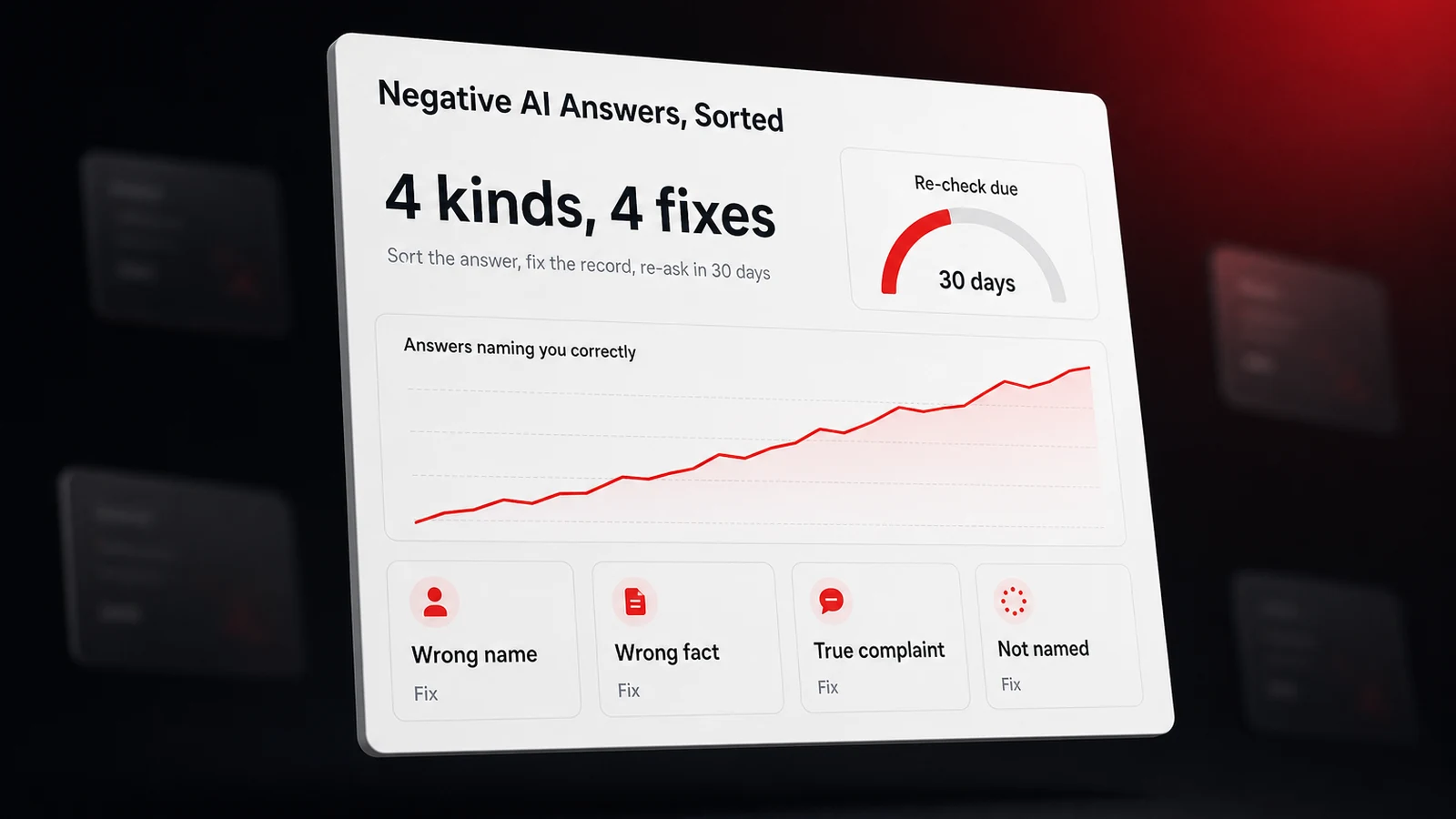
To fix a negative thing an AI assistant says about your business, first decide which of four things it is, because each has a different fix. A wrong fact gets corrected in the record the assistant read, a wrong name gets fixed in your own page titles and listings, a true complaint gets outweighed with newer evidence, and a false, damaging claim gets documented, reported, and if it costs you money, taken to a lawyer. Only the last one is a legal matter. The other three are an assistant repeating something it found, and the way to change the answer is to change what it finds.
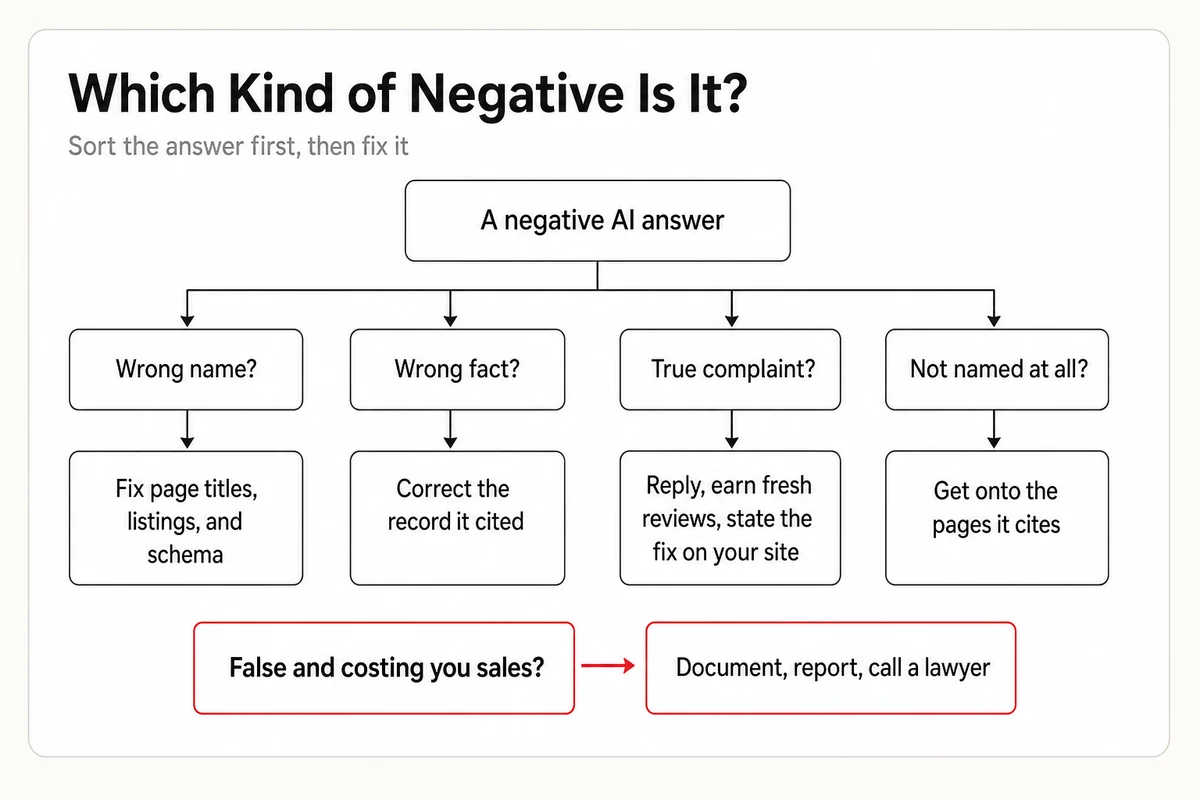
Wrong answers are common enough that customers expect them. In a February 2026 survey of 1,000 US consumers, Data Axle found that 66 percent had run into incorrect business information online and 85 percent said it affects whether they return, while nearly half said they use AI for local search every week. Trust is thin, too. In April 2026, Localogy reported Yelp and Morning Consult research finding that 65 percent of consumers had used an AI search tool in the previous six months, only 15 percent trusted it a lot, and 63 percent double-check what it tells them. That double-check is your opening. A customer who reads something bad about you in ChatGPT, Gemini, Claude, Perplexity, or Google AI usually looks in one more place before deciding, and the fixes below are about making sure that place, and the next answer, tell the truth.
This guide picks up where our walkthrough of what AI says about your business stops. That one shows how to pull every claim out of an answer and sort it. This one is for the moment a claim turns out to be bad, and it uses three real captures from our tracker, with the businesses unnamed, plus one lawsuit that's still in court.
Screenshot the Answer Before You Touch Anything
Before you fix anything, capture the answer, because every later step needs it and the answer may be gone tomorrow. Take a full screenshot that shows the prompt, the date, the assistant, and the source list, and copy the share link if the assistant offers one. Perplexity's own instructions for reporting an inaccurate answer ask for the query URL plus a description of the error and what the correct answer should be, and the other report forms want the same things in different words. Note the city you were in and whether you were signed in, since both change what you see.
Then run the same question twice more in fresh chats. Assistants vary from run to run, and a negative line that appears once in three is a different problem from one that appears every time. Check the time of day as well. In a capture our tracker took just after midnight, ChatGPT's business cards for a Miami car wash question read Closed next to a 5.0 rating, which is accurate at midnight and alarming to a reader who doesn't notice the hour. That isn't a negative claim at all, and ten minutes of evidence gathering keeps you from fixing things that aren't broken.
Keep the evidence even when the fix is simple. The cases below range from a profile edit to a defamation suit, and the one that became a lawsuit rests on a customer who cancelled a contract after reading an AI answer. Without the capture, that's a story. With it, it's a record.
When AI Calls You by the Wrong Name
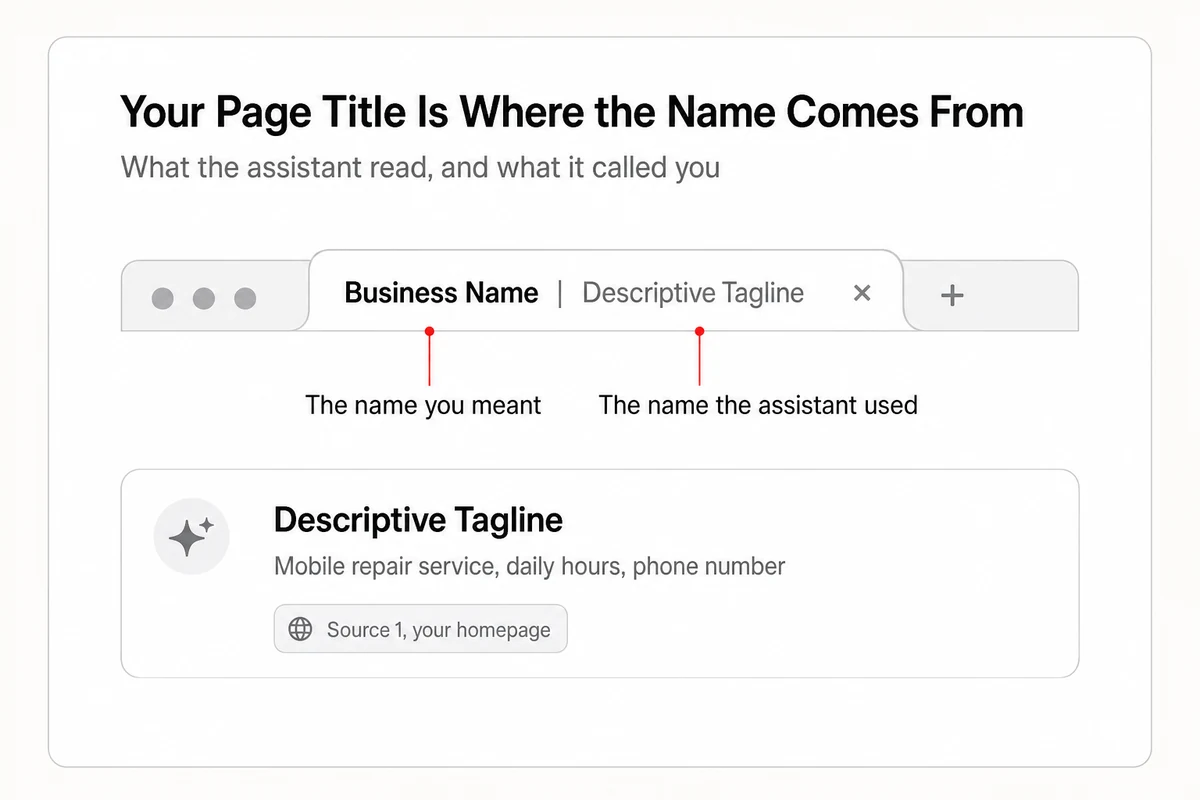
The strangest negative is an answer that describes you accurately and calls you something else, and the cause is usually your own homepage. On October 12, 2026, our tracker captured Perplexity answering a question about the best boat repair in Miami. It listed a mobile marine mechanic we track with the right phone number and the right daily hours, cited that business's own homepage as its first source, and named it by the tagline that sits after the pipe in the page title rather than the business name in front of it. A customer reading the answer would have called the right number and asked for a company that doesn't exist. Our tracker logged the answer as cited but not named, which is the correct verdict and a bad outcome.
A second version of the same fault is a name collision. A heating and air company in Southern California that we track shares the first word of its name with a rival founded decades earlier. When Perplexity was asked for a top heating and AC company in the area, it named the older company, with its founding year, from a 2026 best-of list, and never reached the one we track. The assistant wasn't wrong about anything. It resolved an ambiguous name to the entity with more history behind it.
Both fixes are about making your name unambiguous everywhere an assistant looks.
- Put the business name first in every page title, with the tagline after it, and keep that exact name on your Google Business Profile, Bing Places, Apple Business, and the review sites. An assistant that sees five spellings picks one, and it may not be yours.
- Add LocalBusiness schema with the name spelled the same way, plus sameAs links to your profiles, so the entity is tied together by code rather than guesswork.
- If you share a name with a bigger business, add the differentiator to the name you use, the neighborhood, the specialty, or the founder's full name, and use it the same way for a year. You're giving the assistant a reason to treat you as a separate entity.
When the Fact Is Wrong, Find the Record That Fed It
A wrong fact, closed when you're open, the old phone number, a service you stopped offering, lives in a record somewhere, and the assistant's source list tells you which one. In July 2026, Search Engine Journal reported a vendor test that put 13,365 questions about 165 London businesses to three assistants and checked the answers against the national company register. Ninety-three percent of the businesses had at least one basic fact wrong or missing, and half of the smaller ones were handed at least one outright false fact, against a third of the larger ones. For ChatGPT in particular, our test of why ChatGPT's picture of your business goes stale separates the training snapshot nobody can edit from the search cache you can.
Fix the records in the order the assistants read them. Our breakdown of the sources behind AI's local business data ranks the sources, and the short version is Google first, then your own site, then whichever listing or review page the answer cited.
- Google Business Profile. If an assistant says you're closed and you aren't, open the profile and check whether it's marked temporarily or permanently closed, which you can reverse from the same screen. For a wrong name, address, or hours on the map itself, Google's Maps error report lets you change those facts, and an edit from the verified owner carries more weight than a public suggestion.
- Bing Places. ChatGPT's search runs through Bing among other providers, so a stale Bing listing becomes a stale ChatGPT claim. Claim the listing at Bing Places for Business if you never have, then bring its name, hours, and phone into line with your Google profile, because a listing nobody has touched in two years is exactly the record a search index keeps serving.
- Apple Business. In March 2026, Apple folded Business Connect into Apple Business, free from April 14, 2026, and the place card it feeds appears in Apple Maps, Safari, and Spotlight. Existing Business Connect data migrated automatically, which means an old error migrated with it.
- Your own site. For Claude, this is the main lever. Anthropic's help page on removing content from Claude says that removing content from your site is the best way to ensure it won't appear when Claude searches the web. The same logic runs in reverse. A plain sentence with the current fact, on the page an assistant already cites, is the fastest correction you can publish.
Expect the correction to take weeks to reach the answer, not minutes. Each assistant stores its own copy of your pages, and our measurements of how quickly AI notices website changes put the first recrawl in hours and the answer change in weeks.
When It's True, Outweigh It Instead of Deleting It
Sometimes the negative thing is true. The assistant says customers complain about wait times because three reviews say so, and no form will remove a true sentence. Google's policy on reporting reviews on your Business Profile says you can report any review, but only those that violate its policies are eligible for removal, and a one-star review from a real customer who waited forty minutes violates nothing. The fix is to make the sentence stale.
Review sites are among the pages assistants read, and the captures in our tracker regularly show a Yelp search page or a Better Business Bureau listing in the source list under a local answer. Google AI Mode goes a step further and writes a highlights line under each business card from what reviewers said, a detail we walk through in our comparison of AI Overviews and AI Mode for local businesses. If the recent reviews say the wait is fixed, that's what the highlights line says.
Three moves outweigh a true complaint.
- Reply to the reviews the assistant is summarizing, specifically and without a template. Google's own guidance on getting more reviews notes that replies are public, and a public reply that names the fix is a sentence an assistant can quote next to the complaint.
- Fix the thing, then ask the next thirty customers to post. New reviews that mention the shorter wait don't delete the old ones, but a summary drawn from this quarter's reviews reads differently from one drawn from last year's.
- Say it on your site. A short paragraph that states what changed, with a date, gives the assistant a second source that agrees with the new reviews.
If you'd rather hand the listing cleanup and the site edits to someone, Lighthouse Local for Business combines tracking with specialists who do that work, and nothing goes out until you've approved it.
When a Competitor Gets Named Instead of You
The quietest negative is an answer that never mentions you, and it often happens on exactly one question. Over the last thirty days, a Miami mobile car wash we track was named by every assistant we track on the plain queries, mobile car wash in Miami, mobile car wash near me. This week, when four of the five we track were asked which mobile car wash in Miami is the best choice, they named 21 businesses between them and not that one. Perplexity went further and declared a national booking app the strongest overall pick.
The difference is the sources. The best question pulls best-of lists, Yelp search pages, Better Business Bureau category pages, and in one capture an Instagram reel cited five times, while the plain query pulls business websites and map data. A business that lives only on its own site and its Google profile wins the first kind of question and vanishes from the second. Our post on why AI recommends your competitor and skips you works through the four gates behind that, and the fix starts with the source list in the answer that left you out. Every page cited in that list is a page you can be on, a local best-of list that accepts submissions, a BBB profile you haven't claimed, a Yelp listing with no photos. Get onto the pages the assistant already trusts, and the best answer changes long before your own site does.
Report the Answer, and Know What the Button Does
Every assistant has a report button, and none of them edits the model. What a report does is feed a quality process, and that's worth doing once you've fixed the record, because the source you fixed is now the one you want the assistant to re-read.
| Assistant | Where the report lives | What it can change | What it can't |
|---|---|---|---|
| ChatGPT | Thumbs down under the answer, then Select an issue, then Safety or Legal concern | OpenAI says reported domains may be reviewed by its Model Quality team, which may apply filters so ChatGPT stops relying on unreliable sources | It won't correct a fact. OpenAI's personal data removal process covers people, not businesses |
| Gemini | Feedback on the response, or More, then Report legal issue | A legal report routes to Google's legal review | Feedback alone changes nothing you can see |
| Claude | Anthropic's report form for content that breaks its policies or local law | A review of the cited page | Correcting or removing the page on your own site works faster |
| Perplexity | The flag icon under the answer, or a support ticket with the query URL | A review of that specific answer | The next answer is generated fresh, so the durable fix still lives in the sources |
| Google AI Overviews and AI Mode | Thumbs down on the Overview, or Google's legal content report, filed separately for each Google product | A legal report can remove the content | The legal form lists Search and Maps, so pick the product where the claim appeared |
Three of those links are the ones to bookmark. OpenAI's page on reporting content in ChatGPT is the only place the company describes what happens after a report. Google's legal content report is the route for a claim that crosses from wrong into defamatory. Gemini's inaccurate response feedback steps are where the Report legal issue option lives. Treat every report as a receipt, dated and screenshotted, because the next section is where the receipts matter.
When It's False and Costing You Money, the Courts Are Still Deciding
A false claim that costs you a sale is a different category, and courts are only starting to test it. In March 2025, Wolf River Electric, a solar installer in Isanti, Minnesota, sued Google in state court after an AI Overview said the company was being sued by the state attorney general for deceptive sales practices. The attorney general's case named other companies, and the Star Tribune report carried by GovTech states that Wolf River wasn't a defendant. The company says a customer cancelled a $150,000 contract after reading the Overview, and it seeks between $110 million and $210 million. Google moved the case to federal court in June 2025, and the federal docket shows a judge sending it back to Ramsey County on January 9, 2026, and we found no ruling on the merits since. Google's position is that the Overview described documents whose contents speak for themselves, and the Overview has since been taken down. Legal experts quoted in that report expect an uphill fight for Wolf River, because federal courts have been receptive to Section 230 defenses.
Germany went further. In June 2026, Semafor reported that a German regional court had held Google responsible for its AI Overviews as the company's own content rather than a link to someone else's, in a case where the summaries falsely tied two publishing companies to scams. It's one regional court and an early ruling, but it treats the summary as the publisher's own statement, which is the question every one of these cases turns on.
None of this is legal advice, and a lawsuit is the slowest and most expensive fix available. What the cases do tell you is what evidence matters. Wolf River's complaint rests on the exact false statement, the sources the assistant cited for it, and a documented loss, a cancelled contract. If an assistant is saying something false that's costing you business, build that same file first, send the legal report through the platform's own form, and talk to a lawyer with the file in hand. Most owners never need the last step. The ones who do are glad they started the file on day one.
Re-Ask in Thirty Days, Because Fixes Land Slowly
Every fix here lands on a delay, so the last step is a date on the calendar. Thirty days after you correct the record, reply to the reviews, and file the reports, ask the same question in the same assistants from a fresh chat and compare the answer to your screenshot. Score it on the four kinds. Is the name right, is the fact right, has the complaint been outweighed, and are you named at all. Whatever hasn't moved tells you which record the assistant is still reading, and the source list under the new answer tells you where.
If you'd rather not run that check by hand, Lighthouse Local's AI visibility tracker re-asks your questions in ChatGPT, Gemini, Claude, Perplexity, and Google AI and shows, answer by answer, whether you were named, cited, or neither, which is how the wrong-name capture above was spotted. And before any of it, a free AI audit run on your own site will tell you whether your pages carry a consistent name and the structured data that ties your profiles together. A bad answer is a pointer to a record. Fix the record, then check the pointer again next month.
Frequently asked questions
How do I fix wrong information ChatGPT gives about my business?
Open the source list under the answer and correct the record it read, usually your Google Business Profile, your Bing Places listing, or a page on your own site, since ChatGPT's search runs through Bing among other providers. Then use the thumbs down and report the answer, which OpenAI says can lead its quality team to filter unreliable sources. Expect the change to reach answers in weeks.
Can I make an AI assistant remove a negative statement about my business?
Only if it's false and crosses a legal line. Google's legal content report, Gemini's Report legal issue option, and Anthropic's report form all exist for that case. If the statement is true, no form removes it. You outweigh it by replying to the reviews behind it, earning newer reviews, and stating the fix on your own site.
Why does AI say my business is closed when it's open?
A record it read says so. Check whether your Google Business Profile is marked temporarily or permanently closed, which Google lets you reverse, then check Bing Places and Apple Business, which carry their own copies of your hours. An assistant card captured outside business hours can also read Closed, which is accurate at that moment and not a claim to fix.
Can you sue Google or OpenAI for what an AI says about your business?
Businesses have started to. Wolf River Electric sued Google in 2025 over an AI Overview that falsely said it was being sued by Minnesota's attorney general, and the case was back in state court as of January 2026. A German regional court held Google responsible for AI Overviews that falsely tied two publishers to scams, in a ruling reported in June 2026. Lawsuits are slow and expensive, so document the answer, file the platform's legal report, and talk to a lawyer before anything else.
How long does it take for AI to update what it says about my business?
The first recrawl of a changed page usually happens within hours, but the answer itself typically changes over weeks, because each assistant stores its own copy of your pages and listings. Re-ask the same question thirty days after your fixes and compare it to your original screenshot.