We Crawled Our Own Blog and Found Six Stranded Posts
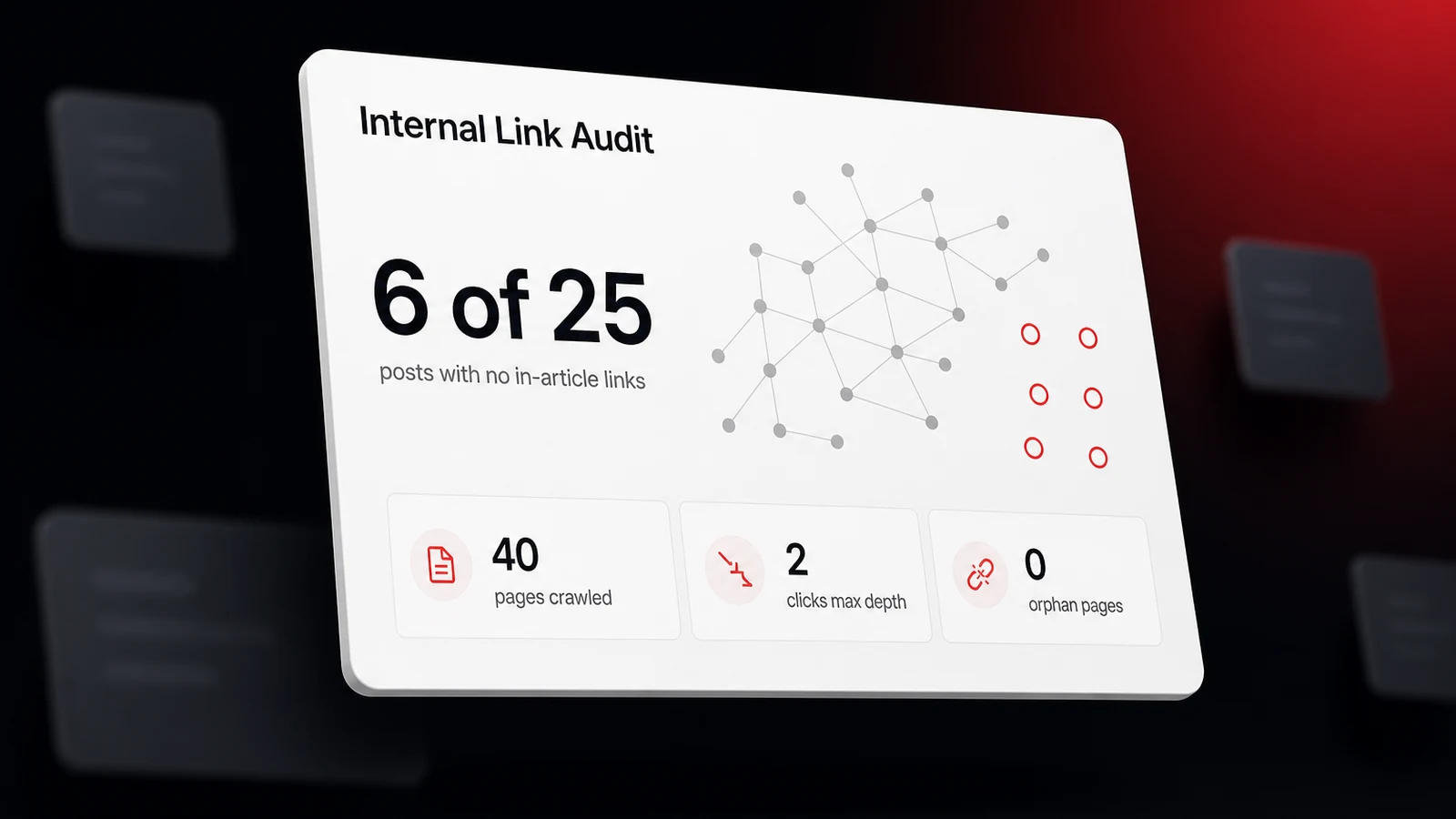
Internal linking for local SEO means linking your service pages, city pages, and guides to each other with descriptive anchors, so Google and the AI crawlers can find each page and learn what it covers. A page no other page on your site links to barely exists to them, and that rule is easy to break without noticing, so before writing a word of advice we ran the check on ourselves. In September 2026 we crawled www.lighthouselocal.ai the way a search engine would, starting at the homepage and following every link. The first pass looked clean. All 40 URLs in our sitemap were reachable, none sat more than two clicks from the homepage, and nothing was orphaned.
Then we counted only the links written into the body of our 25 blog posts, the kind a reader meets mid-sentence. One post, our walkthrough for checking AI recommendations, had collected 16 of them. Six posts had none. All six were reachable through the blog index and a category page, so no crawler would call them orphans. Yet no other article ever pointed a reader, or a crawler, at them in context. Four of the six had gone up in the previous week. We'd linked out from each new article and never gone back to link in.
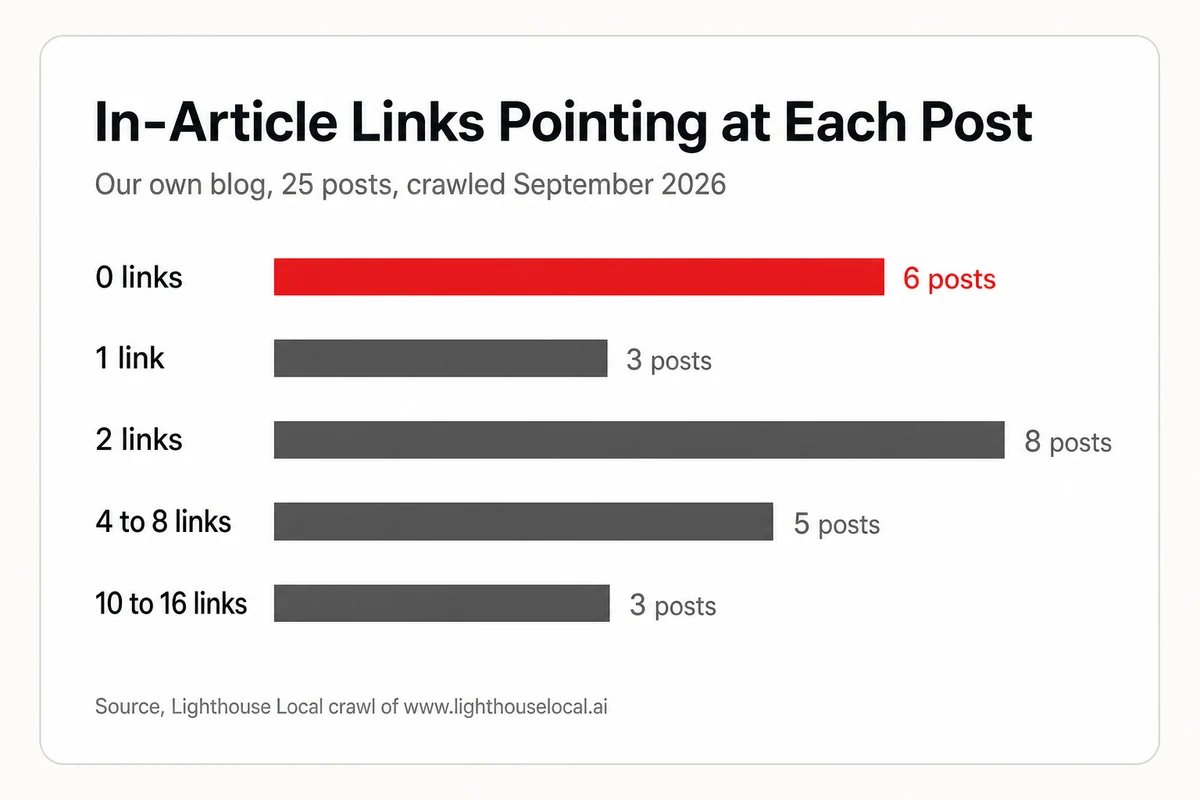
That's the most common internal linking problem on a small site, and a local business site has it worse, because the pages that earn the money are service pages and city pages, not blog posts. This guide covers how a link gets a page discovered, a link map for a local site, anchor text, location pages, breadcrumbs, and a thirty-minute audit you can run this week. It also links three of our six stranded posts along the way, because the fix really is that small.
No Link, No Discovery, for Googlebot or an AI Crawler
An internal link is a link from one page on your site to another page on your site. It does two jobs. It lets a crawler find the destination, and its words tell the crawler what the destination is about. Google's link best practices are blunt on the first job. "Generally, Google can only crawl your link if it's an <a> HTML element (also known as anchor element) with an href attribute." The same page adds the rule this whole post hangs on. "Every page you care about should have a link from at least one other page on your site."
A sitemap helps with discovery too, and our explainer on how an XML sitemap aids crawling covers that half. A sitemap can't do the second job, though. It lists a URL with no words around it, so it says nothing about what the page means or how much you care about it. A link from your busiest service page says both.
The AI side raises the stakes. In August 2025, SEO consultant Glenn Gabe published a first-hand test of how AI assistants handle JavaScript rendering. He pointed three major assistants at a site whose content only appears after JavaScript runs. ChatGPT told him more than once that it couldn't read the page because the page relied on JavaScript rendering, and the other two came back empty as well. A menu that only exists after a script runs is in the same position as that content. If your navigation is built by a widget or a page-builder script, open View Source on your homepage and search for one of your service URLs. If it isn't in the raw HTML, assume some crawlers never see it.
Here's the honest ceiling on all this. In 2026, Rankability's State of AI Search report examined 1,645 AI citations across 31 topics and 11 AI platforms, and found that 98.5% of AI-cited pages had internal links, with a median of 12 per page. The same report found link count was "nearly neutral" for where a page landed in the citation order. So internal links are the entry ticket, not a dial you keep turning. Pages that get cited are connected pages, and piling on more links past that point buys nothing. Our explainer on how answer engines retrieve and cite content walks through what happens after discovery.
Local Search Experts Put Internal Links in Their Top Ten
Whitespark's Local Search Ranking Factors report, published in November 2025 for the 2026 edition, asked 47 local search experts to score 187 factors. For local organic rankings, the regular blue links under the map, "Dedicated Page for Each Service" ranked first, "Internal Linking Across Entire Website" ranked sixth, and "Keywords in Anchor Text of Internal Links" ranked 19th. Those three belong together. A page for each service is the asset, and internal links are how that asset gets found and understood.
The same survey is a useful reality check. For the map pack, internal linking across the site ranked 47th, and for AI search visibility it ranked 46th, while a dedicated page for each service ranked second for AI visibility. Internal links won't move your pin on the map. What they do is lift the service pages that rank in organic results and that assistants quote.
Yext's research team saw the same pattern from the AI side. In a 2026 analysis of which brand pages AI models cite, covering 10 businesses across 1,800 US locations, broad category questions in parcel services cited the local branch page 60.9% of the time. Questions naming a specific service, such as document disposal or an ID photo, cited a dedicated service page 84.1% to 89.1% of the time. Yext's advice was to give each high-intent service a page that "names the offer, explains availability, and links back to the local page." That last clause is an internal linking instruction. Service pages and location pages answer different questions, and the links between them are what let a crawler treat them as one business.
The Link Map, Page Type by Page Type
Most local sites have the same five kinds of page. Here's what each one should link to in its body copy, and where its own links should come from. Menu and footer links are the baseline. The links in this table are the ones written into sentences.
| Page type | Links out to | Gets links from |
|---|---|---|
| Homepage | Every core service page, the locations hub, your newest or strongest guide | Every page, through the logo and menu |
| Service page | The two or three closest related services, each location where you offer it, one guide that answers a pre-sale question | Homepage, sibling services, every location page that offers it, related guides |
| Location or service-area page | The services offered there, neighboring areas, the locations hub, the contact or booking step | Locations hub, service pages, guides that mention the area |
| Blog post or guide | The one service page it supports, two or three related guides | That service page, related guides, the blog index |
| About and contact | Services hub, locations hub | Every page, through the menu and footer |
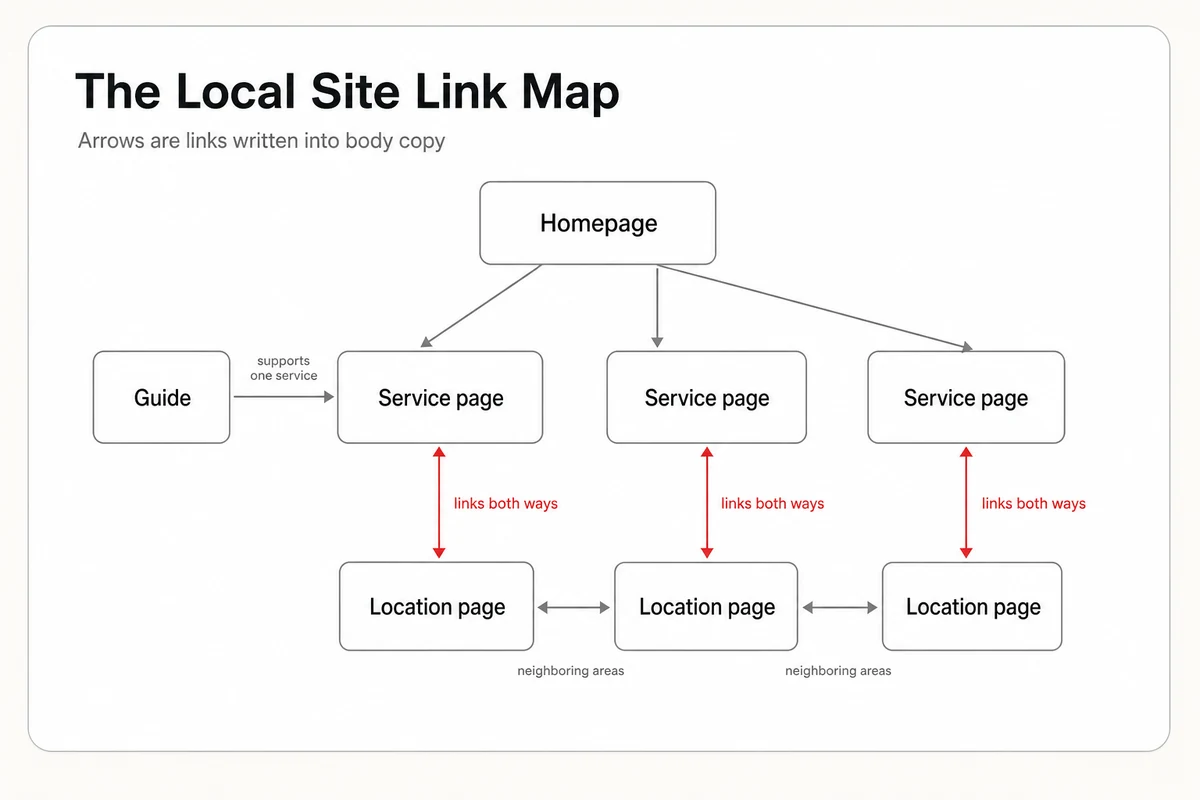
Two rules sit on top of the map. First, links run both ways. A drain cleaning page that links to your east-side location page should get a link back from that location page. Second, a new page isn't published until at least two older pages link to it. That's the exact step we skipped on our own blog, and it's why four new posts sat stranded.
How many links is too many? Google's guidance says "there's no magical ideal number of links a given page should contain," then adds that if you think it's too much, it probably is. For scale, the 2025 edition of the HTTP Archive's Web Almanac, in its SEO chapter published in January 2026, found the median desktop page carries 43 links to its own site and the median mobile page 39, menus and footers included. A local service page with a normal menu and five to ten links in its body copy sits comfortably inside that.
Anchor Text That Names the Service and the Town
Anchor text is the clickable wording of a link, and it's the second job from earlier, telling a crawler what's on the other end. Google describes good anchor text as "descriptive, reasonably concise, and relevant to the page that it's on and to the page it links to," and calls out generic filler such as "read more" and "website" as the kind to avoid. The Web Almanac's link-text audit shows where sites slip. On desktop, 92.42% of inner pages passed the descriptive link text check and only 84.64% of home pages did. Home pages are where the "Learn more" buttons live.
For a local business, a descriptive anchor usually names the service, the place, or both. Here's the same link written two ways.
<!-- Weak. The anchor says nothing about the destination. -->
<p>We also install water heaters. <a href="/services/water-heaters">See more</a> about our services.</p>

<!-- Better. The anchor names the service, and a second link names the area. -->
<p>We handle <a href="/services/water-heaters">tankless water heater installation</a>
for homes across <a href="/locations/your-city-east">[Your City]'s east side</a>.</p>
Don't turn this into a formula. When a site owner asked in July 2026 whether to hide a menu link so a keyword-rich link lower on the page would count instead, Google's John Mueller replied that they were overthinking it, and that Google "has practice dealing with lots of websites." Write the anchor a customer would understand out of context, vary it the way you'd naturally vary a sentence, and move on.
Location Pages Need Neighbors, Not a Footer Full of Cities
The usual way a local site links its city pages is a footer block listing 30 towns. Every page links to every city, so technically nothing is orphaned, and it's the same trap our blog fell into. A footer link repeats on every page with a bare town name as its anchor. It tells a crawler the page exists and nothing about why it matters.
Give each location page neighbors instead. Link it from the service pages you really deliver in that area, in a sentence that names both. Link it to the two or three adjacent areas a customer might also search. Link it up to a locations hub that lists every area once. And make sure the page your Google Business Profile points at is part of the web, not a dead end. In the Whitespark survey, internal links to the GBP landing page from other pages of the website ranked 39th of 187 factors for local organic rankings and 44th for the map pack, a modest signal, and one that costs a sentence to add.
One caution. A city page that only swaps the town name into the same paragraph gives nobody a reason to link to it, including you. If you can't write one sentence on a service page that naturally points to the location page, the location page probably needs real content first, such as jobs you've done there, the neighborhoods you cover, or drive times from your shop.
Breadcrumbs Put the Hierarchy in Writing
A breadcrumb is the small trail near the top of a page, such as Home, then Services, then Water Heaters. It's a set of internal links that states where the page sits, on every page, with no effort after setup. Google's breadcrumb documentation says a breadcrumb trail "indicates the page's position in the site hierarchy, and it may help users understand and explore a site effectively."
Add the visible trail first, as plain links. Then describe it in BreadcrumbList structured data so machines don't have to infer it. Here's the markup for a service page, ready to adapt.
<script type="application/ld+json">
{
  "@context": "https://schema.org",
  "@type": "BreadcrumbList",
  "itemListElement": [
    {
      "@type": "ListItem",
      "position": 1,
      "name": "Home",
      "item": "https://yourdomain.com/"
    },
    {
      "@type": "ListItem",
      "position": 2,
      "name": "Services",
      "item": "https://yourdomain.com/services"
    },
    {
      "@type": "ListItem",
      "position": 3,
      "name": "Water Heater Installation"
    }
  ]
}
</script>
The last item has no URL because it's the page you're on. If you've already added the business details from our guide to LocalBusiness schema markup for local sites, this block sits alongside it in the same format. It's also a friendlier kind of markup than review stars, where Google's rules explain why your own star ratings might not show however clean the code is.
Run the Thirty-Minute Link Audit
You don't need our crawler to find your own stranded pages. Two free tools and one prompt cover it.
- Open the Links report in Google Search Console. Under Internal links, open Top linked pages and sort from fewest links to most. Your most important service and location pages should be near the top of the count, not the bottom. Google's Search Console Links report guide notes that the report is a sample limited to 1,000 rows, which is plenty for a local site, and that its top linking text table covers links from other sites only. It won't show your internal anchors.
- Crawl the site. The free version of the Screaming Frog SEO Spider crawls up to 500 URLs, enough for most local sites. It reports each page's crawl depth and inbound link count, and it can compare the crawl against your XML sitemap to find orphan pages. Export the internal links.
- Run the View Source test from earlier on your homepage and one service page, so you know your menu links exist without JavaScript.
- Hand the export to an assistant. It's the same export-and-paste routine we used when we showed how to turn a Lighthouse report into a fix list. Here's the prompt.
Below is an internal link export from a crawl of my local business website. Each row is one link, with the source URL, the destination URL, and the anchor text.

My most important pages are: [paste your service page and location page URLs].

1. For each important page, count how many different pages link to it from body content, ignoring menu and footer links that repeat on every page.
2. List any important page with fewer than three such links.
3. For each page on that list, suggest three existing pages that could naturally link to it, and write a descriptive anchor for each that names the service or the area. Never suggest bare filler like "here" or "learn more".
4. List every anchor used more than once that says nothing about its destination.

Only use URLs that appear in the export. If something is unclear, ask me before guessing.

[paste the export]
The three-link floor in that prompt is our own rule of thumb, not a Google number. It's simply the point where a page stops depending on a menu to be found. Work the list from your highest-value service down, add the links inside sentences that were already making a point, and re-crawl a week later. If you'd rather not do the on-page work yourself, you can add done-for-you services to any plan, where Lighthouse Local's specialists do the work and you just approve it, and our plans and pricing show what's included.
Link the Pages You Want Found
Internal links are the rare SEO fix that costs nothing, needs no developer, and is fully under your control. Ours took one crawl to diagnose, and the repair is a sentence here and a sentence there in posts we'd already written. Yours will look the same, with service pages and city pages in place of articles.
If you want a quick read on the basics first, our free AI visibility audit counts the internal links on your homepage as one of its SEO signals, next to your sitemap, structured data, and page speed, and returns a ranked fix list for your site. What it doesn't do is tell you what assistants say once they've found those pages. That's the job of Lighthouse Local's AI visibility tracker, which asks ChatGPT, Gemini, Claude, Perplexity, and Google AI what your customers ask and records who gets named. And if you'd like to try that by hand first, start with our walkthrough on checking what AI says about your business. Whichever order you take them in, the rule from Google's own documentation is the one to keep. A page you care about gets a link from a page that already matters.
Frequently asked questions
What is internal linking in local SEO?
Internal linking is connecting the pages of your own website to each other with regular HTML links. For a local business that means linking service pages, location or service-area pages, and guides together so search engines and AI crawlers can find each page and understand which service and which area it covers.
How many internal links should a page have?
Google says there's no ideal number. The 2025 Web Almanac found the median desktop page carries 43 links to its own site, menus and footers included. For a local service page, a normal menu plus five to ten descriptive links in the body copy is a sensible range.
Do internal links help with AI search?
They help a page get discovered and understood, which comes before being cited. A 2026 Rankability study found 98.5% of AI-cited pages had internal links, but also found that adding more links didn't improve citation order. Treat internal links as a requirement, not a ranking trick.
What is an orphan page?
An orphan page is a page on your site that no other page links to. Crawlers can only reach it through a sitemap or an outside link, and nothing tells them what it's about. Google's guidance is that every page you care about should have a link from at least one other page on your site.
Should I link to all my city pages from the footer?
A footer list keeps city pages reachable, but it isn't enough by itself. Footer links repeat on every page with a bare town name, so they carry little meaning. Also link each location page from the service pages you deliver there, in a sentence that names the service and the area.
How do I find pages with no internal links?
Open the Links report in Google Search Console and sort internal links from fewest to most, then crawl your site with a tool such as Screaming Frog, whose free version handles up to 500 URLs and can compare the crawl against your sitemap to list orphan pages.